One home for everything MoLock
If you use MoLock, you have probably typed 7ot.app already. Everything MoLock does online lives under that one short name:
- The website, in English and Arabic, with the guides, this blog and the download.
- Your dashboard at 7ot.app/me/, where you see your PCs, your plan, your mail and your family in one place.
- Your email address, name@7ot.app, free with every account.
- The links you send: share links for files from your encrypted vault, and the new one-time support links that let someone you trust see your screen.
- MoLock's own messages, which always come from noreply@7ot.app.
Why one short domain instead of a handful of long ones? Because it is easy to say on the phone, easy to type on a small keyboard and, above all, easy to check. One rule protects you from a whole family of fake pages: if a page asks for your MoLock password and it is not on 7ot.app, it is not MoLock. A single name makes that rule simple enough to teach to anyone in your family.
Why "7ot"? A whale, written the way we type
Long before phones came with Arabic keyboards, Arabic speakers found a way to write their language with the Latin letters they had. Some Arabic sounds have no Latin letter, so numbers that look a little like them stepped in: 3 for ع, 2 for the hamza, and 7 for ح. Millions of people still write this way in chats every day, without thinking twice.
Write حوت, the Arabic word for whale, in that style and you get 7ot. Say it like "hoot", with the soft, breathy ح at the start. It is a name that Arabic speakers read instantly and everyone else can type without trouble.
The whale is the one in the MoLock icon: a single clean line, with one amber dot for an eye. We chose it for what a whale is. It is calm, it is strong, and it is quiet. It is the largest animal in the sea and it makes no fuss about it. That is how we want security software to feel: present and powerful, and out of your way until the moment you need it.
A whale is calm, strong and quiet. That is exactly how we want protection to feel.
The amber eye is also the one signal colour you see across MoLock, from the buttons in the app to the dot on the lock screen. Everything else stays in calm graphite, so the amber only appears where it means something.
One account for your PCs, mail, passwords and family
Your MoLock Account is what ties it all together. Sign in once, and the same account covers:
- Your PCs. Link the PCs you use, see their status and alerts, and reach them from your phone with remote control.
- Your mail. A free name@7ot.app address that you read in the MoLock window or in any browser. Since 3.1, MoLock spots sign-in codes in new mail and gives you a one-click Copy code.
- Your passwords. MoLock Keys keeps your logins, cards and secure notes encrypted so that only you can open them, and fills them in for you on websites and in desktop apps.
- Your family. With Premium, a family group with calm parental controls, time limits and a way for children to ask for more time.
- Help when you need it. One-time support links that let someone you trust see your screen, for a few minutes, on your terms.
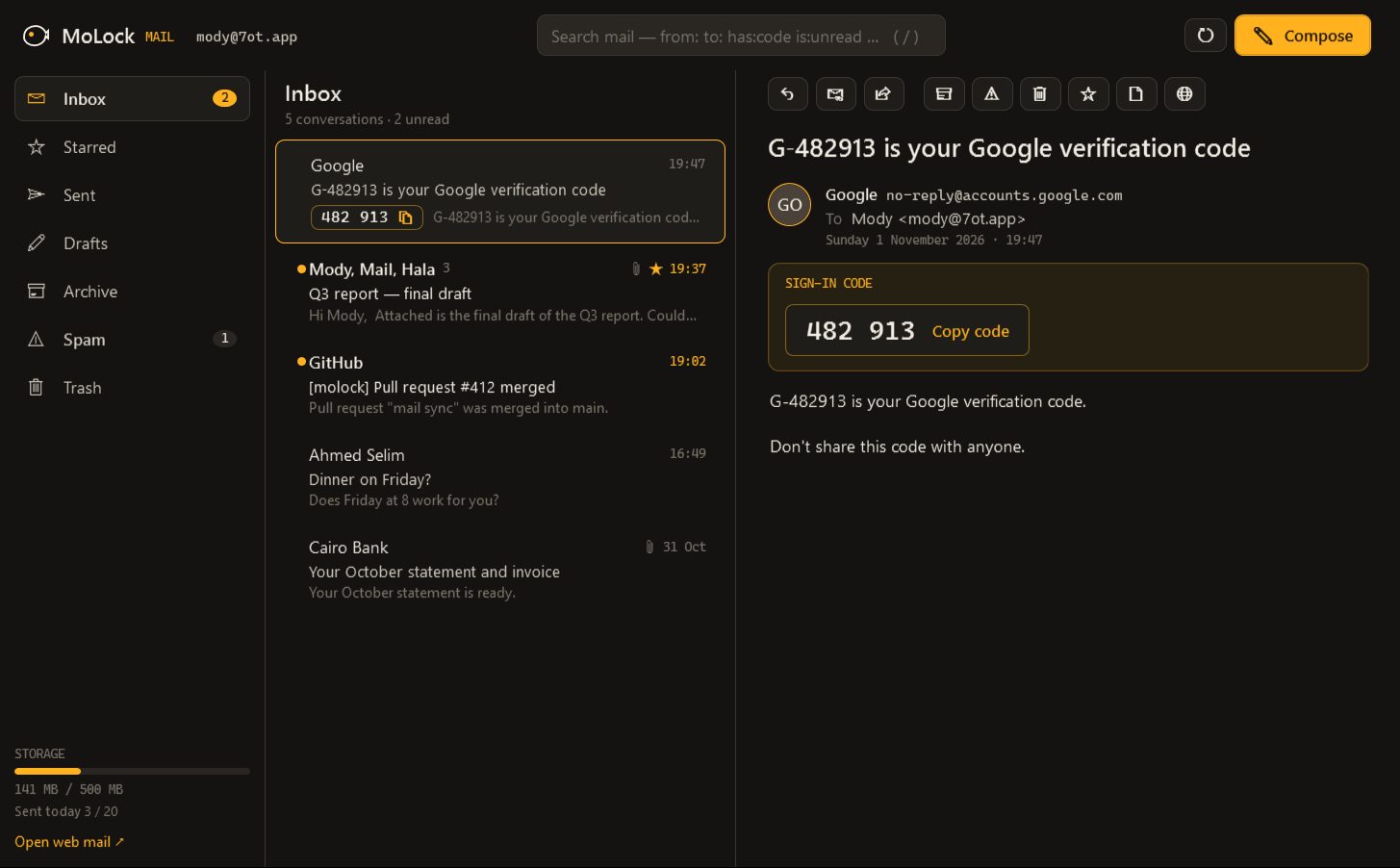
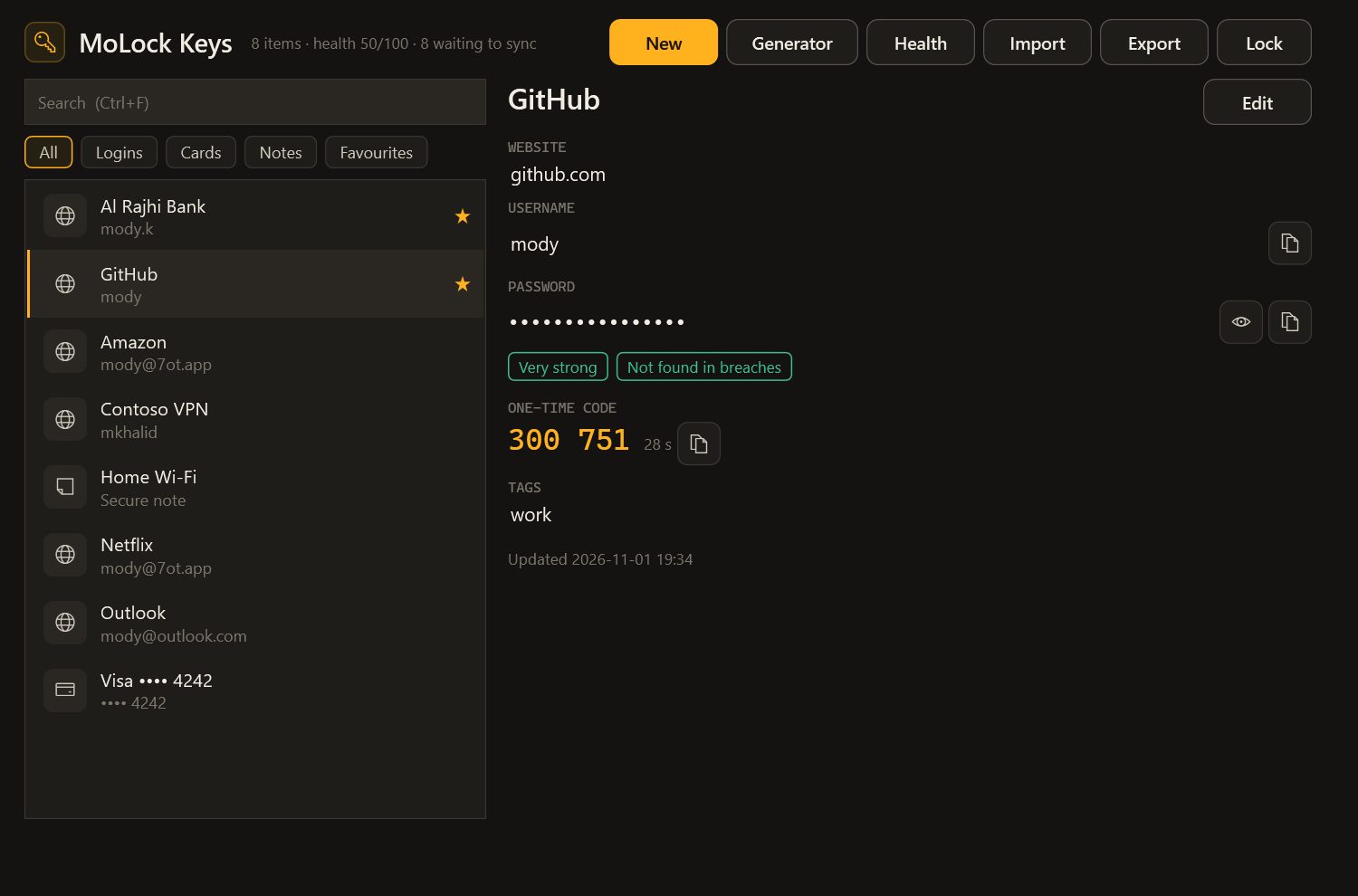
The account page explains what lives where, and Your free 7ot.app email walks through the mailbox in detail.
Made in Egypt, by one developer
MoLock is built in Egypt by Mahmoud Mohamed, known to most people as Mody. It is not a large company with a support department and a marketing team. It is one developer who writes the Windows app, the website, the service behind your account, and reads the suggestions you send.
MoLock started as a lock screen for a single PC. Over time it grew an account, an official bot, remote control from your phone, an encrypted vault, a set of everyday tools, its own mail and, now, a password manager. Each of those steps came from the same question: what would make a PC safer and calmer to live with, for an ordinary family?
Being small shapes the product in ways you can feel. Every feature has to earn its place, because someone has to look after it for years. Arabic and English are equals, with right-to-left layouts done properly rather than as an afterthought. And when you write in, the person who reads your message is the person who builds the app. The about page tells the longer story.
The principles that do not change
Plans change, features come and go, but a few commitments sit underneath everything:
- Free, with no ads. MoLock is free to use and shows no advertising. Premium exists for heavier use, such as more PCs, more storage, unlimited remote minutes, family controls and unlimited items in MoLock Keys. It comes as a serial, not as a card payment on the website.
- Local protection never depends on the cloud. The lock screen and every protection that runs on your PC work the same on every plan, online or offline. Even if an account is suspended, the PC keeps locking the way you set it up.
- End-to-end encryption where it matters. Your vault, your passwords in MoLock Keys and your remote sessions are sealed on your own devices, and the service only ever holds data it cannot read. Stored mail is sealed with a key only your account holds.
- Counts, not people. Usage statistics are counts only: how often a feature is used, sent once a day, with nothing personal attached. You can turn them off.
- Crash reports you control. When the app hits an error, it can send the error type and where in the code it happened, with no files, paths, names or content. That, too, has an off switch.
What MoLock 3.1 brings
Version 3.0 gave MoLock its home at 7ot.app. Version 3.1, which we call Everyday power, fills that home with tools you will reach for every day:
- MoLock Keys, a password manager that fills logins in your browser and in desktop apps, generates strong passwords and flags weak or reused ones. Up to 100 items free, unlimited with Premium.
- A ransomware shield that pauses a program the moment it starts changing your files in bulk and asks you to stop it or allow it, plus a Restore my files wizard and one Security health page with a single score.
- A data usage monitor that shows which apps use your internet, warns you at 50, 80 and 100 % of your plan, and can show a tiny live meter on screen.
- Quran & adhkar: a mushaf reader, a daily wird, morning, evening and after-prayer adhkar with counters, and gentle reminders. It is entirely optional.
- Support links for getting help safely, with smoother remote video that uses about a third of the data. Read Get help with your PC safely for the full story.
- Screen translate, free: select part of the screen and read it in Arabic or English.
- Mail 3.1: sign-in codes detected with a one-click Copy code, desktop notifications and a faster reader.
For the release before this one, see Introducing MoLock 3.0.
A public roadmap you can shape
Version 3.1 also opens up the most important list we keep: what we build next. The roadmap is public, on the website, in the app and in your dashboard. Every item carries one of four statuses:
- Planned: coming in the next releases.
- In progress: being built right now.
- Shipped: already in MoLock, with the version it arrived in.
- Considering: ideas we are weighing, where your votes help decide.
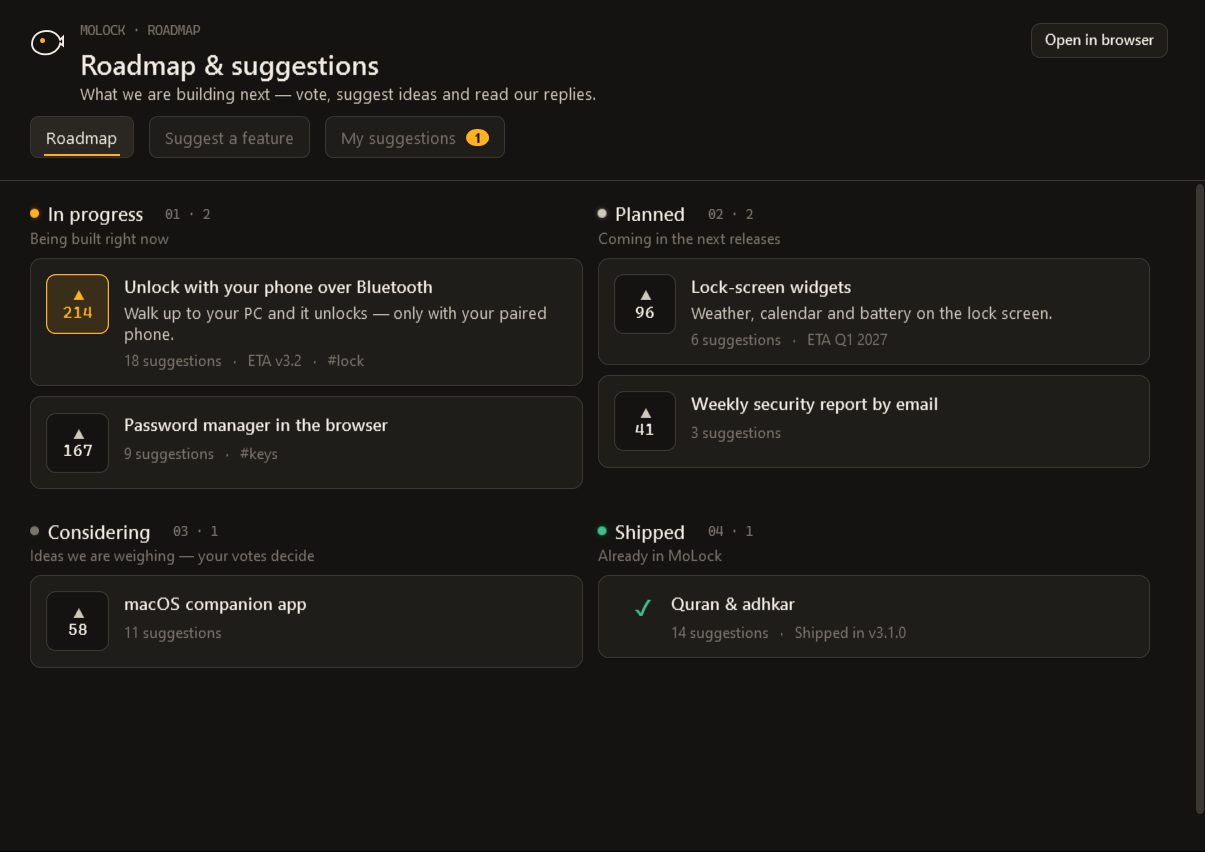
You can vote for the items you care about: one vote per MoLock account, counted but never shown with names. And if what you want is not on the board, you can suggest it:
- Open Suggest a feature. In the app, choose Roadmap & suggestions from the tray menu. You can also suggest from your dashboard, or on the website while you are signed in.
- Write your idea in one line. Add details if you like: what problem it would solve and how you would use it. One idea per suggestion works best.
- Send it. If someone already had the same idea, your voice is added to theirs and you are shown similar roadmap items you can vote for too.
- Read the reply. Your suggestion appears in My suggestions as Received, then Accepted, Later or Not planned, with a written answer.
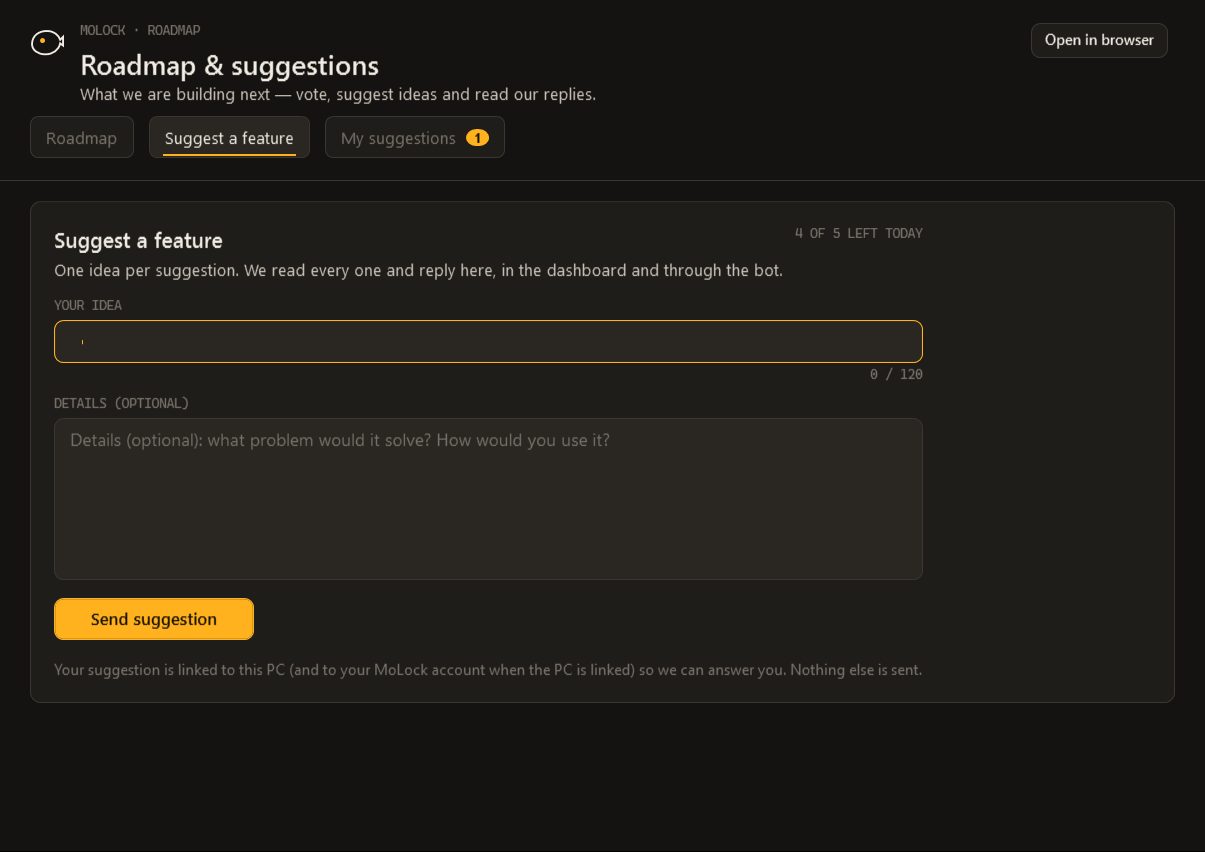
Replies come to you wherever you already are: in the dashboard's notification centre, through the official bot, and by push notification or email if you have chosen those channels. When an idea is accepted and later moves to In progress or Shipped, you hear about that too. When several people suggest the same thing, they are joined together, so one answer reaches everyone who asked.
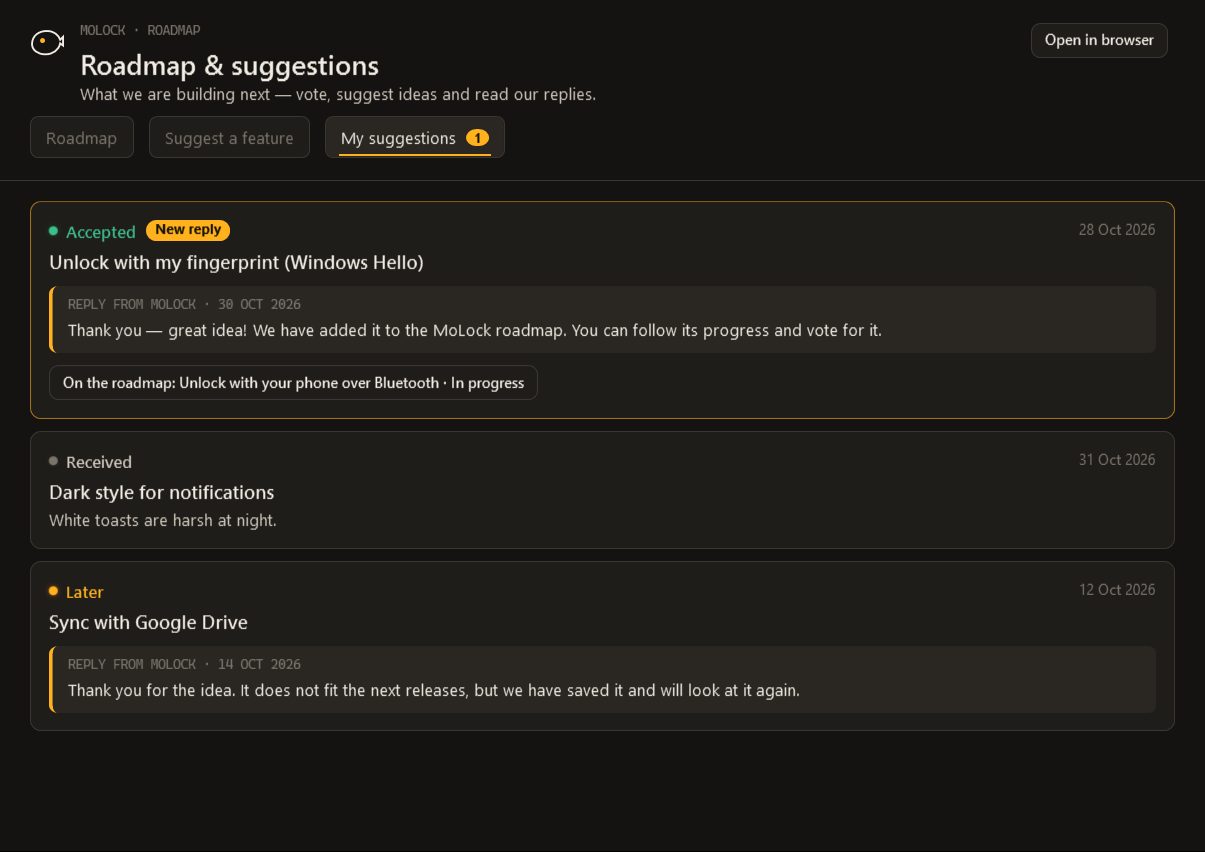
A few sensible limits keep the board useful: a handful of suggestions per day, and no walls of links. You can withdraw a suggestion as long as it has not been answered yet.
What comes next
We will not promise dates in a blog post. The honest answer to "what's next?" is the live board on the roadmap page: it shows what is planned, what is being built and what has just shipped, and it changes as the work does.
What we can promise is the direction. The lock on your PC stays dependable and works offline. Arabic and English stay equals. The free plan stays free and without ads. And the features that touch your private life, your screen, your passwords and your messages, stay sealed so that we cannot read them.
If you have an idea, the Suggest button is the fastest way to reach the person who builds MoLock. If you are new here, start with the download, and welcome to 7ot.app.