Every alert, on the channel you actually read.
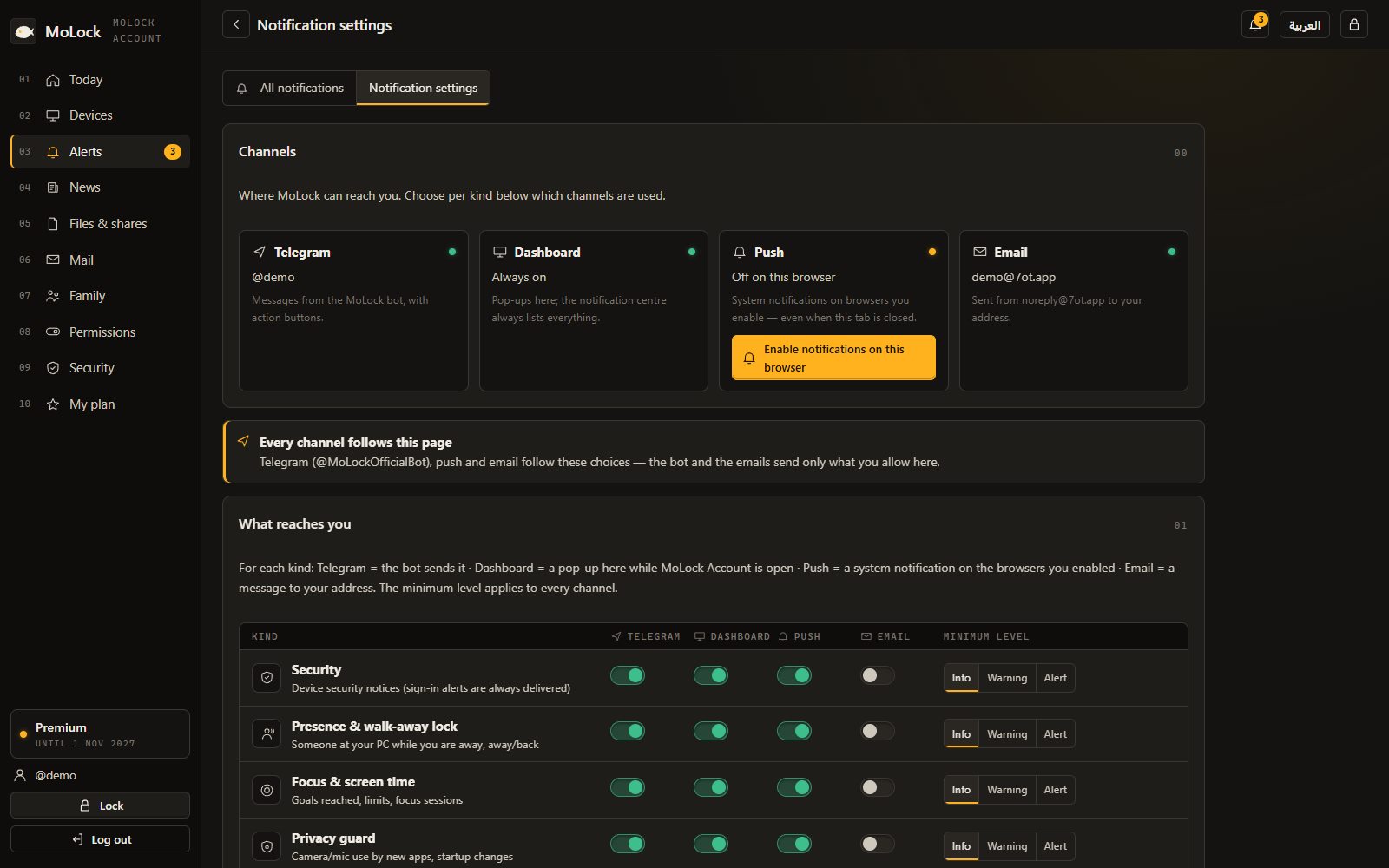
Before 3.0, alerts lived in Telegram and the dashboard. Now you can also receive them as push notifications in your browser or phone and as email — and choose per alert: wrong passwords everywhere, new mail as a quiet push, the weekly report by email.
New in 3.0FreeFree · four channels · quiet hours
| Alert | Bot | Web | Push | |
|---|---|---|---|---|
| Wrong password | ||||
| New email | ||||
| Child asks for time | ||||
| New device on the network | ||||
| Weekly report |
Quiet hours23:00 – 07:00Security alerts always get through
19:42
MoLock · nowWrong password on DESKTOP-MOTap to see the photo and lock now
Mail · 1 min agoNew email from Ahmed Samir
- Channels4
- Telegram needed0
- Quiet hours1
- Security alerts muted0
01 / 08How it works
Turn on a channel. Route each alert.
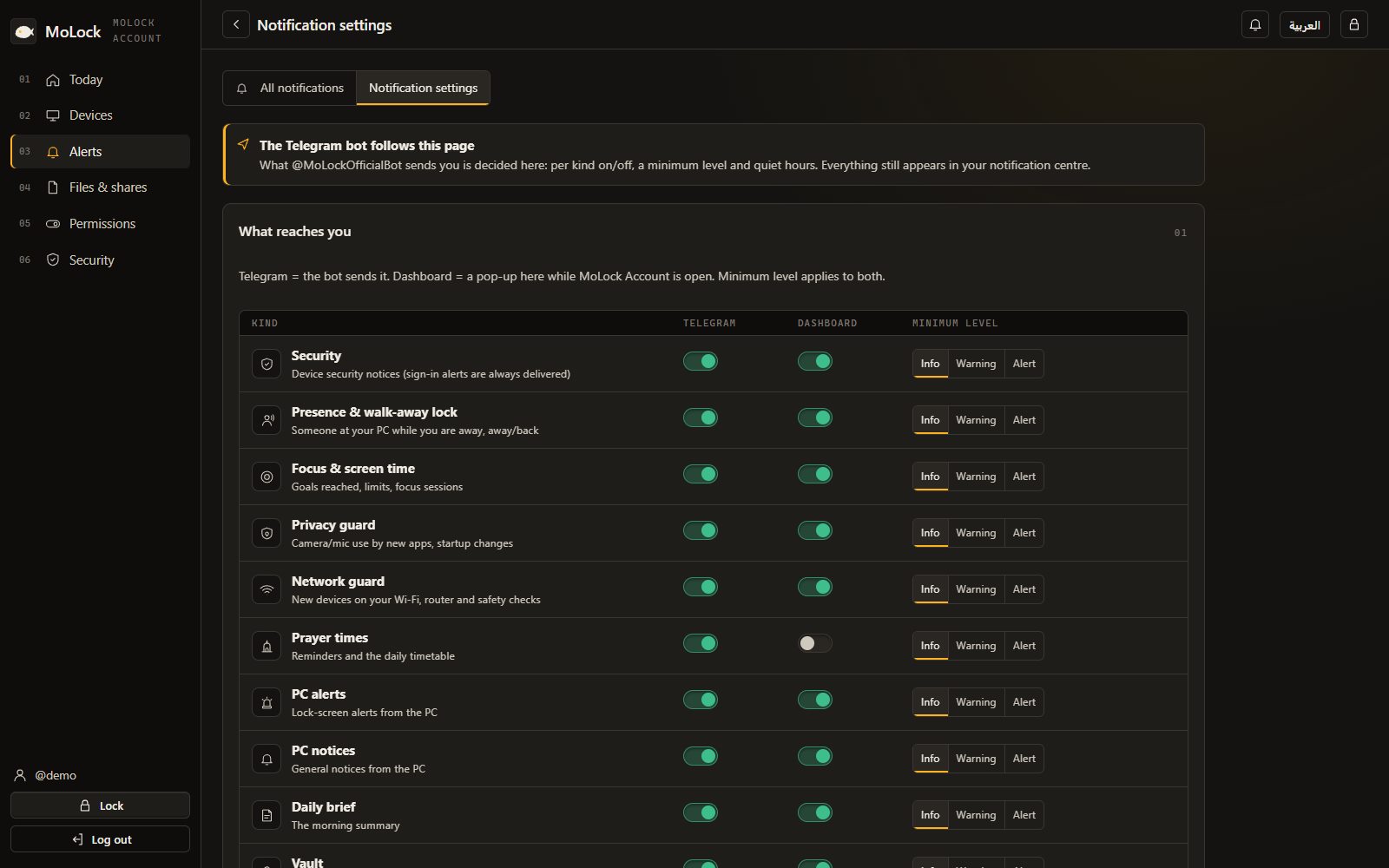
Everything is set in the dashboard under Notifications; the PC and the bot follow it.
- 01Step 1/3
Enable push in your browser
Open 7ot.app/me/ on your phone or PC, allow notifications and, on phones, add it to the home screen for app-like alerts.
- 02Step 2/3
Confirm an email address
Use your 7ot.app address or any address you verify; system mail comes from noreply@7ot.app.
- 03Step 3/3
Choose per alert
For each kind of alert, tick bot, web, push or email and set quiet hours. Security messages always get through.
02 / 08What it does
Four channels. One set of rules.
Notification preferences in the dashboard decide what goes where; nothing is sent twice by accident.
Telegram bot
Alerts with action buttons — Lock now, approve, deny — exactly like before.
Web dashboard
Every alert in the dashboard's activity, with its details and photo.
Push
Native notifications in your browser or on your phone — no Telegram needed.
Email
Branded, readable emails in English or Arabic, light or dark.
Quiet hours
Silence the night; urgent and security alerts still reach you.
Security first
Sign-ins, wrong passwords and tamper alerts are never muted.
Privacy & network alerts
New devices on your Wi-Fi or a new app using the camera — on the channel you pick.
Digests
An optional weekly digest by email instead of many small messages.
19:42
MoLock · nowWrong password on DESKTOP-MOTap to see the photo and lock now
Mail · 1 min agoNew email from Ahmed Samir
03 / 08News, not noise
Announcements inside the app. No channel to join.
MoLock news — new versions, tips, maintenance — now appears in the app and the dashboard. You no longer need to follow a Telegram channel.
- "What's new in 3.0" tourA short guided tour after the update shows what changed.
- In-app newsAnnouncements arrive quietly in MoLock's news panel.
- Account emailsWelcome, verify, new sign-in, PC linked, serial activated, plan expiring.
04 / 08Privacy
Short messages. No tracking pixels.
Alerts carry the minimum: what happened, on which PC, and a link to the dashboard for details you open after signing in.
No previews unless you allow
Mail subject hints and photo thumbnails stay out of notifications by default.
Per-browser push
Each browser you allow appears in the dashboard and can be removed in one click.
One-click unsubscribe
Optional emails like the digest include an unsubscribe link.
On your channels
- What happened and when
- Which PC
- A link to the details
Stays in the dashboard
- Photos inside emails
- Mail contents in push
- Your passwords or codes
To deliver
- Your channel choices
- Browser push registrations
- The verified email address
05 / 08Dashboard & bot
The dashboard decides. Every channel follows.
One preferences table for every PC and every alert — change it once and the bot, push and email all follow.
- A row per alert kind, a column per channel, plus a minimum level.
- Quiet hours in your time zone.
- Security messages ignore quiet hours and always arrive.
06 / 08Limits
Exactly what it does. And what it doesn't.
Push needs a modern browser
On iPhone, add 7ot.app/me/ to the Home Screen first; then notifications work like an app.
Email can be slower
Email depends on your provider; for urgent alerts keep push or the bot on too.
Your phone must be online
Push and bot messages arrive when your phone has a connection.
The bot is optional
Telegram remains available, but you no longer need it to get alerts.
07 / 08Read more
In-depth guides. In plain words.
Introducing MoLock 3.0: one home at 7ot.app
Version 3.0 is the biggest step since MoLock Account: one address for everything, your own inbox inside the app, family controls, a much faster converter and an install that is far harder to tamper with. Here is what changed, and what deliberately did not.
Your free 7ot.app email: a private inbox in MoLock
MoLock 3.0 can give you an email address of your own on 7ot.app, free. Here is how to choose a good handle, how the inbox works, and, honestly, what its encryption does and does not cover.
Secure sign-in, no hassle: passkeys and one-tap approval
Passwords are tiring and codes are fiddly, and a convincing fake page can collect both. MoLock 2.9 adds passkeys and one-tap approval, so the safest way to sign in is also the quickest.
08 / 08Questions
Notifications: bot, push & email
Do I need Telegram to get alerts?
Not any more. Since 3.0 alerts can also arrive as push notifications in your browser or on your phone and by email, and you pick the channel for each kind of alert in the dashboard.
How do I turn on push on my phone?
Open 7ot.app/me/ and allow notifications. On iPhone, add the page to your Home Screen first, then turn notifications on from there.
Are security alerts muted during quiet hours?
No. Sign-ins, wrong passwords and tamper alerts always get through; quiet hours apply to ordinary alerts only.
Free · no ads
Try it on your PC today.
Windows 10 & 11 · works without an account; the dashboard is optional and free