MoLock

Everything that protects you is free. Premium when you need more.

Locking, intruder photos, alerts, the account, remote control and mail stay free, with no ads. Premium adds more PCs and storage, family controls, the pro converter and session recording — with one serial that covers several PCs.

New in 3.0No card payments on the site · a serial from the developer

  1. 01The two plans
  2. 02Full comparison
  3. 03How serials work
  4. 04Where to enter it
  5. 05At a limit
  6. 06Get a serial
  7. 07Questions
MoLock Premium — Free vs Premium, Plans & Serials
  • PCs10PREMIUM
  • Storage20GB
  • Family members6
  • Remote minutes∞

01 / 07The two plans

A real free plan. And one for when you need more.

We never weaken protection to push an upgrade: everything that protects your PC stays on Free. Premium is for room, family and pro tools.

FreeFor everyone

Free

Free. No ads, no card.

  • Locking, intruder photos and alerts — unlimited
  • Up to 2 PCs on the account and 500 MB of storage
  • A name@7ot.app email and 20 sends a day
  • Remote control and direct connection · 60 minutes a day
  • The basic converter and 30 days of history
Download MoLock — free

PremiumWith a serial

Premium

Everything in Free, and more — several PCs on one serial.

  • Up to 10 PCs and 20 GB of storage
  • Family & parental controls for up to 6 members
  • Unlimited remote minutes with session recording
  • The pro converter: video, audio, office, ebooks and big batches
  • Files up to 4 GB, 500 sends a day, 400 days of history and priority support
Get a serial

02 / 07Full comparison

Every feature. Every number.

Current default values. They are enforced on our servers and shown the same way in the app and the dashboard.

Free plan vs Premium
FeatureFreePremium
PCs & storage
PCs linked to your account210
Cloud storage (files, mail and recordings)500 MB20 GB
Vault key backupIncludedIncluded
Mail & files
Your own name@7ot.app emailIncludedIncluded
Emails you can send per day20500
Encrypted share linksIncludedIncluded
Largest file you can upload100 MB4 GB
Remote control
MoLock Remote in any browserIncludedIncluded
Direct connectionIncludedIncluded
Remote minutes per day60Unlimited
Session recording—Included
Tools & history
Converter: images, PDF basics, text, archivesIncludedIncluded
Pro converter: video, audio, office, ebooks, presets, batches over 20—Included
Dashboard history kept30 days400 days
Synced notes, to-dos, reminders and stickies500Unlimited
Family & support
Family & parental controls—Included
Family members06
Priority support—Included

Storage is shared by files, mail and session recordings. Values may change in future with notice, and an account gets the best active plan among its PCs.

03 / 07Serials

One serial. Several PCs.

Premium isn't bought by card on the site; it comes with a serial sold directly by the developer. Each serial covers up to N PCs — stated when you get it — for a set period or for life.

What a serial looks like7OT-K4M2Q-8XW3D-R7PNA-5HT9CThe last character catches typos · only the last four characters are ever shown again
  • Covers up to N PCs

    Each PC has at most one serial; each serial covers several PCs.

  • Move or release

    New PC? Release the old one's slot in the dashboard and activate the new one.

  • Hard to guess

    Stored in a form that can't be reversed; after 5 wrong tries an hour, entries pause for an hour.

04 / 07Where to enter it

Three places. Same result.

The serial binds to the PC and your account together, and the features reach the PC in signed information that can't be faked locally.

  • The setup wizard

    When you install or update to MoLock 3.0, the Plan step lets you paste your serial straight away.

  • Settings → Account & plan

    On any PC at any time: paste the serial and press "Activate on this PC".

  • The dashboard at 7ot.app/me

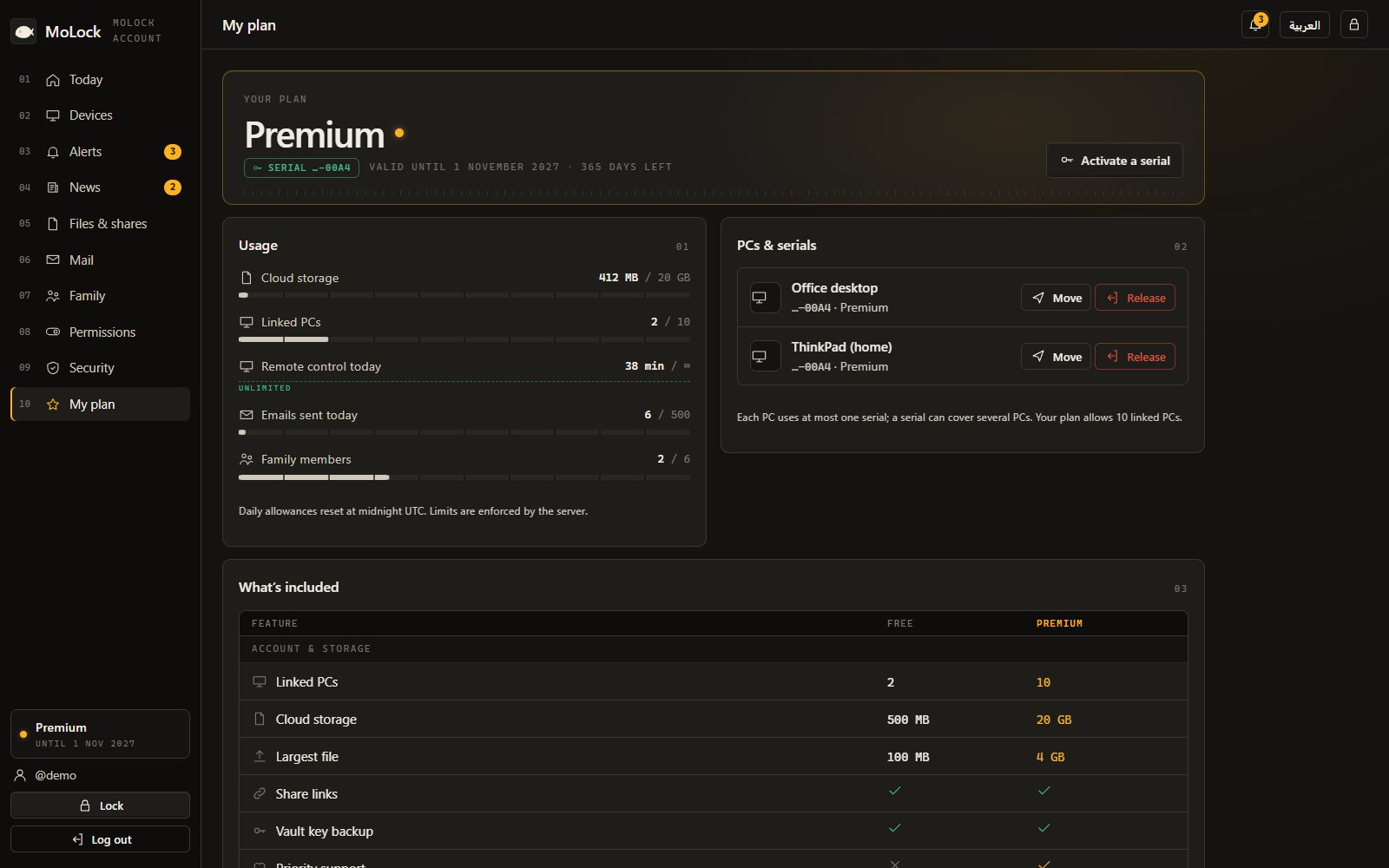
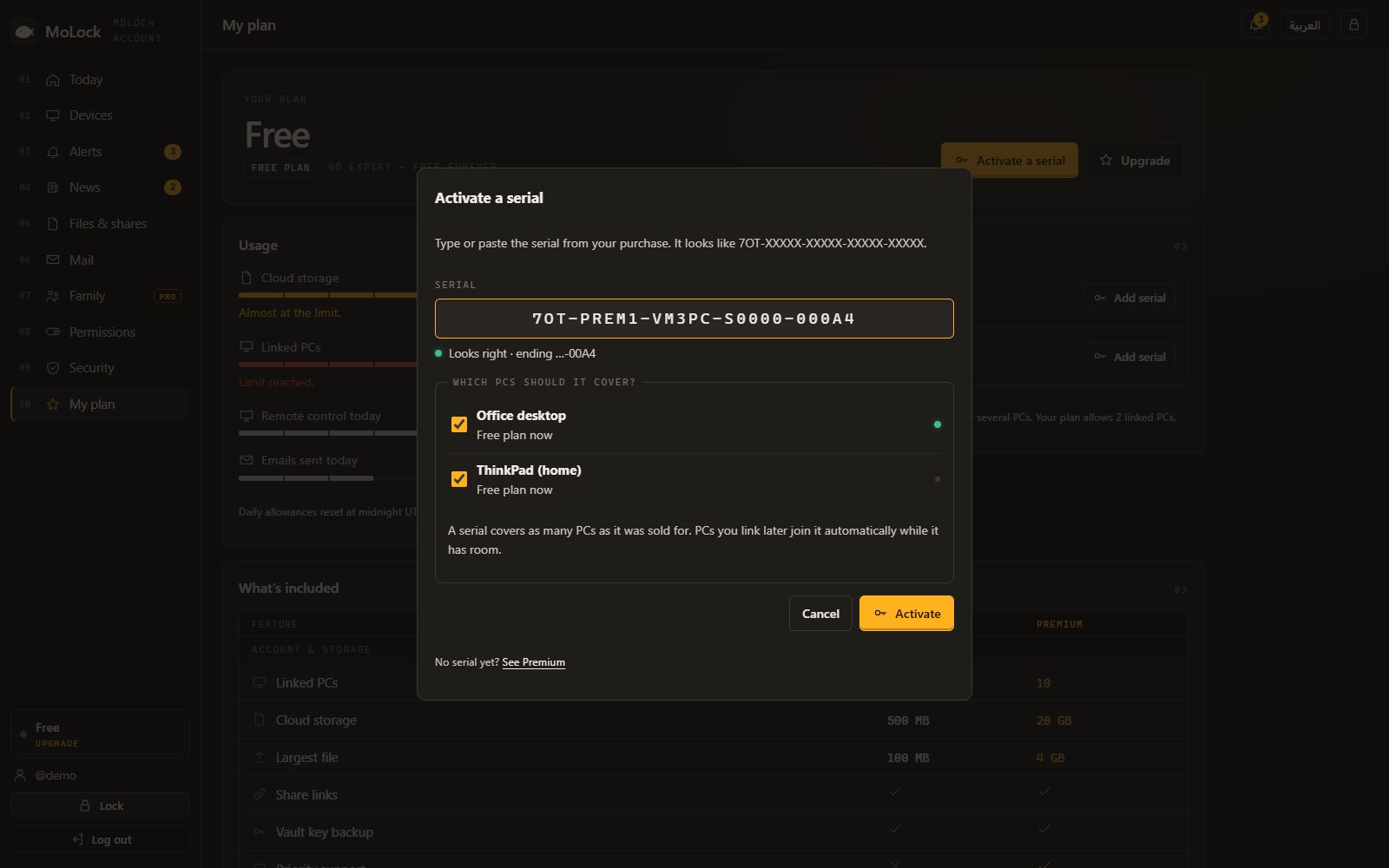
    The Plan page: enter the serial, pick the PC, and move PCs between serials or release them.

Activating a serial in the MoLock dashboard and choosing which PCs it covers
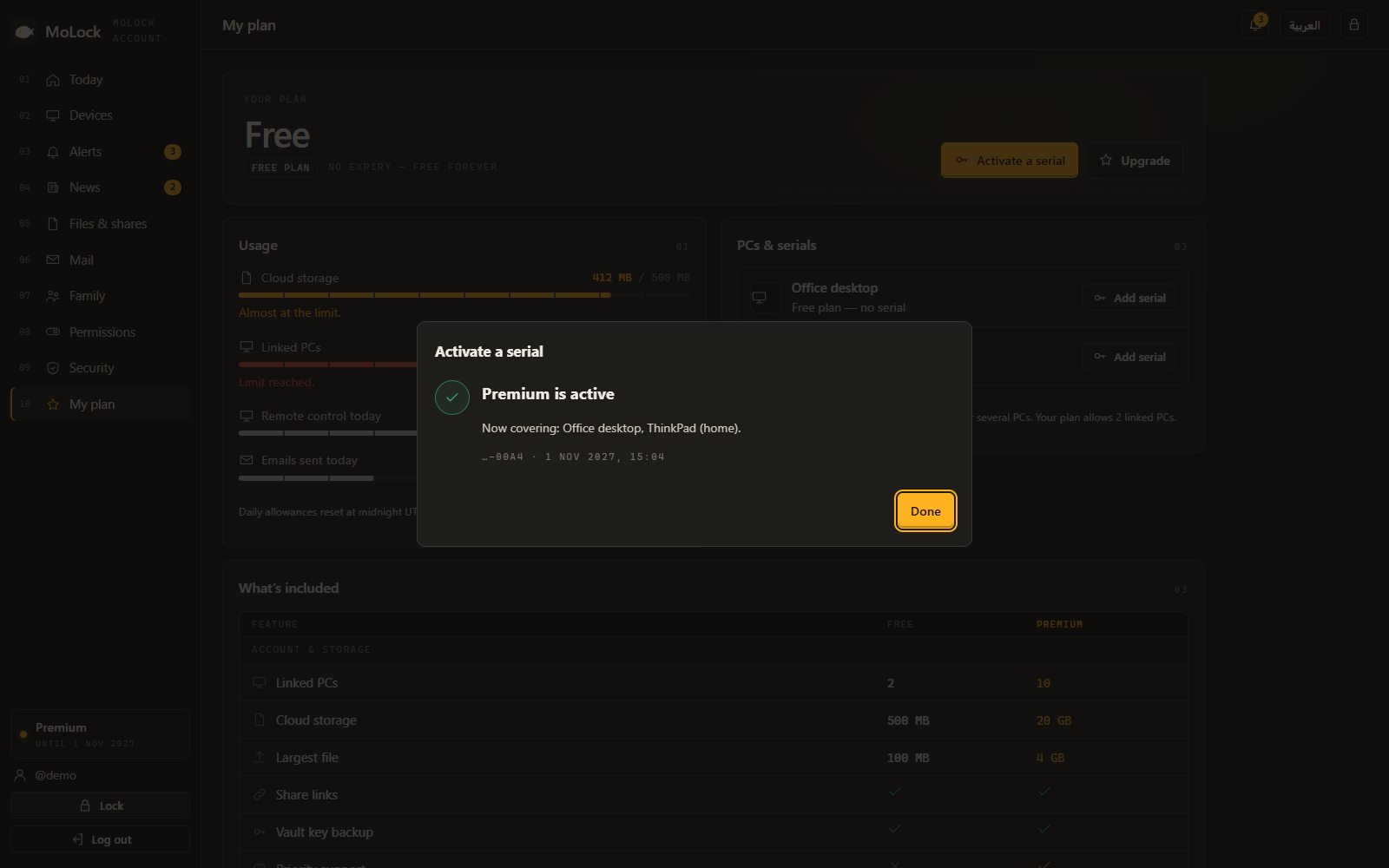
Premium is active: the serial now covers two PCs

05 / 07At a limit

Nothing breaks. Ever.

  • Local protection never stopsLocking, photos and alerts work on every plan — even if an account is suspended.
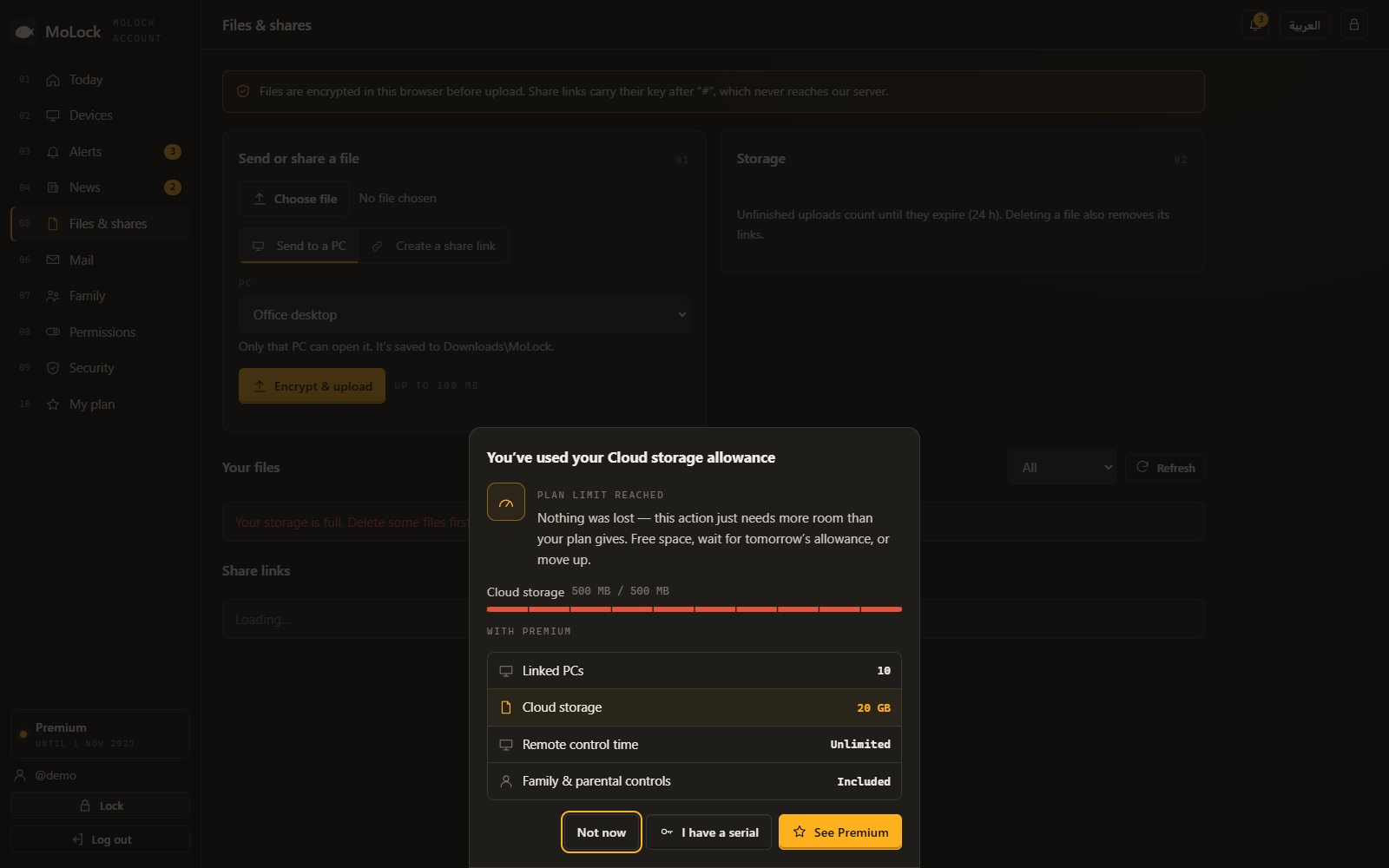
  • A calm card, not an errorWhen a feature needs Premium or you reach a daily limit, a clear card explains what happened and your options.
  • When a serial endsThe PC returns to the Free features without deleting your data; new uploads or sends may pause if you're above the Free limits.
  • Fair rulesLimits are enforced on our servers, equally for everyone; violations fall under the Terms of service.
The calm upgrade card when the free storage allowance is used — nothing is lost

How to get a serial

Message us, get your serial. No cards on the site.

Tell us how many PCs you want to cover and for how long. You receive your serial in a private message; nothing is charged on this website.

Ask for a serial on WhatsAppEmail support@7ot.app

Once you have it: enter it in Settings → Account & plan, or in the dashboard.

06 / 07Questions

Premium & serials

All plan questions

What's the difference between Free and Premium?

Free includes full protection, 2 PCs, 500 MB of storage, mail, 60 remote minutes a day, the basic converter and 30 days of history. Premium raises that to 10 PCs, 20 GB, unlimited remote minutes with recording, the pro converter, 400 days of history, family for up to 6 members and priority support. The full table is on the Premium page.

How do I get Premium? Do I pay on the site?

There are no card payments on the site. Premium comes with a serial sold directly by MoLock's developer — use "How to get a serial" on the Premium page and tell us how many PCs and for how long.

Where do I enter my serial?

In one of three places: the setup wizard, Settings → Account & plan on the PC, or the Plan page of the dashboard at 7ot.app/me, where you pick the PC. It looks like 7OT-XXXXX-XXXXX-XXXXX-5HT9C.

How many PCs does one serial cover?

Each serial covers a set number of PCs, stated when you get it. A PC has at most one serial, and from the dashboard you can move a PC to another serial or release its slot for a new one. Your account gets the best active plan among its PCs.

What happens when Premium ends or I hit a limit?

Nothing breaks. A calm card explains the limit and offers Premium, and the PC goes back to the Free features. Local protection — locking, intruder photos, alerts — always keeps working, whatever the plan.

Can serials be guessed?

No. Serials are stored in a form that can't be reversed, only the last four characters are ever shown again, and after 5 wrong tries in an hour, entries pause for an hour.

Download MoLock — free