One password to remember. The rest, sealed.
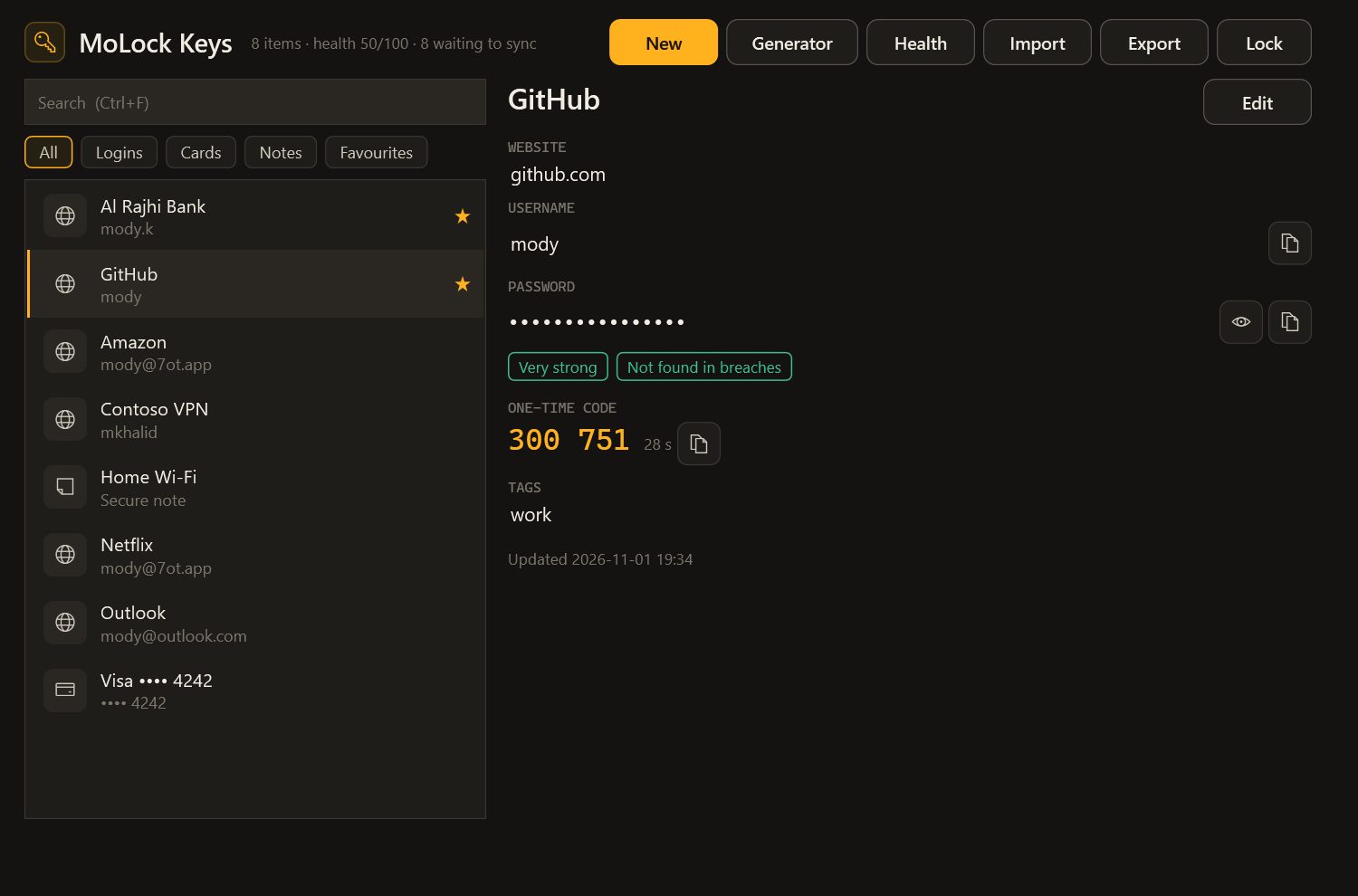
MoLock Keys is the password manager inside MoLock. Logins, authenticator codes, cards and secure notes are sealed on your PC before they sync, so the service only ever holds boxes it cannot open. Keys fills passwords in your browser and in desktop apps, points out the weak, reused and breached ones, and locks itself when you step away.
New in 3.1Free + PremiumFree up to 100 items · unlimited with Premium · Edge, Chrome & Firefox
- Free items100
- Clipboard cleared after20SEC
- Characters sent to check a breach5
- Passwords kept in the extension0
01 / 09How it works
Import. Connect. Stop remembering.
Keys lives in the MoLock app on your PC. The browser, your desktop apps and the dashboard all ask it — nothing else holds your passwords.
- 01Step 1/4
Bring your passwords
Export them from Chrome, Edge, Firefox, Bitwarden or LastPass and import the file into Keys, on the PC or at 7ot.app/me/keys/. Then delete the export — it holds every password in plain text.
- 02Step 2/4
Choose how you unlock
Your MoLock password, Windows Hello or a quick PIN of 4 to 12 digits. By default Keys locks after 10 idle minutes, and whenever MoLock or Windows locks.
- 03Step 3/4
Connect your browser
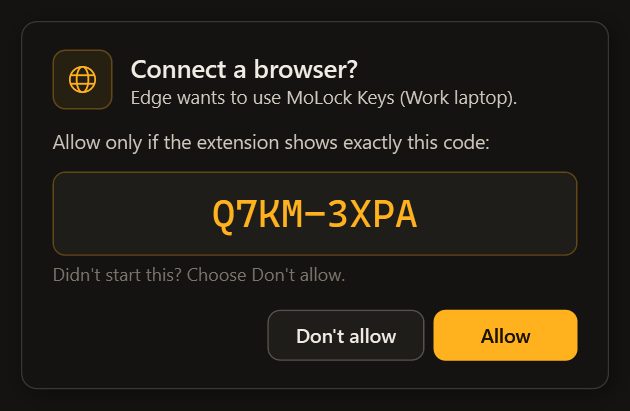
Add the MoLock Keys extension and press Connect. Allow it in MoLock only when both sides show the same matching code.
- 04Step 4/4
Sign in as usual
Keys offers to fill, to save a new password and to update a changed one — in the browser, in desktop apps and from Ctrl+Alt+K.
02 / 09What it does
Everything a vault should do. Nothing it shouldn't.
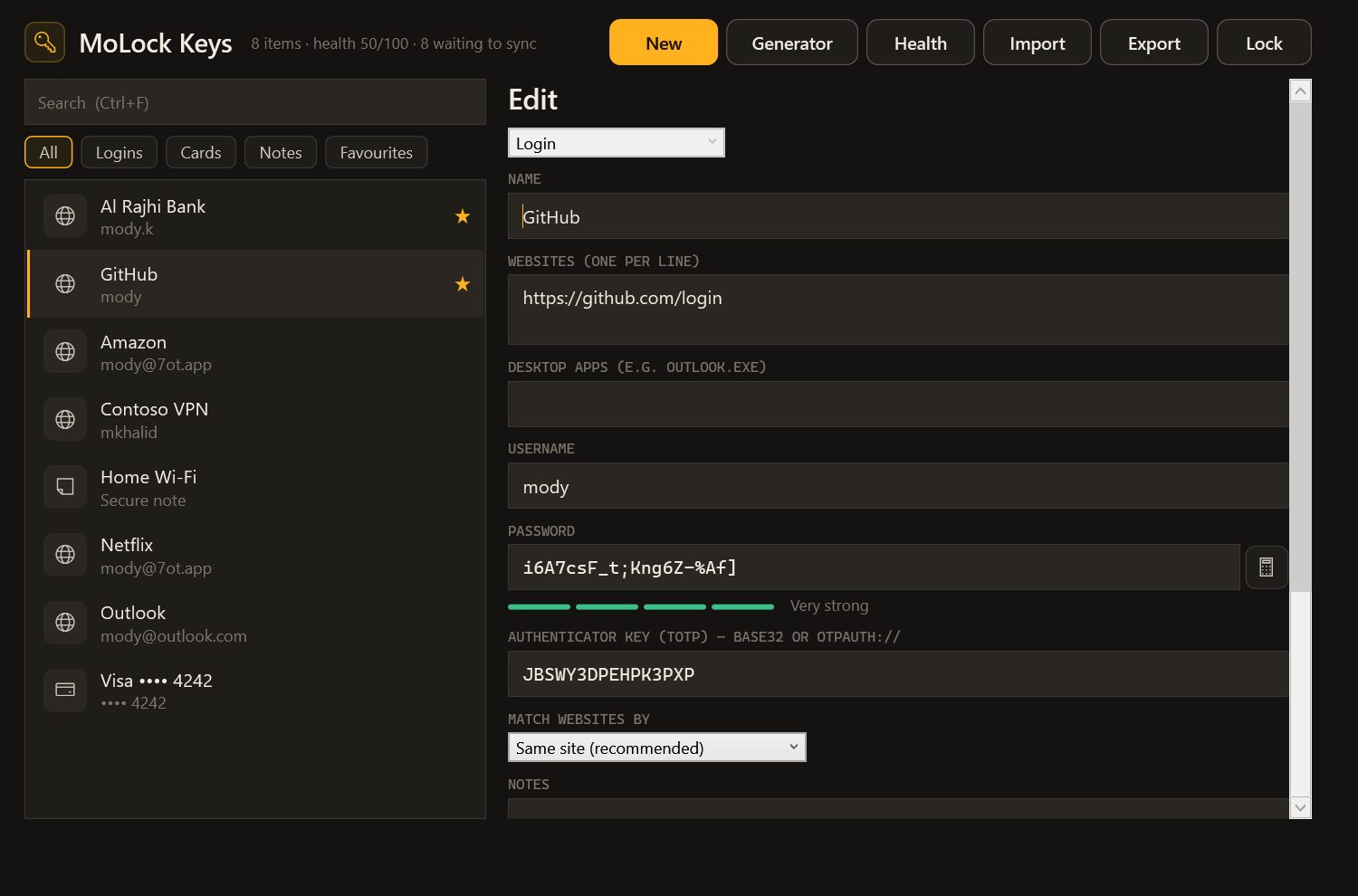
Logins for sites and desktop apps, authenticator codes, payment cards and secure notes — with tags and favourites to keep a long list tidy.
End-to-end encrypted
Each item is sealed on your PC before it syncs. The copy on disk stays sealed too, tied to your Windows account.
Browser extension
Fills logins in Edge, Chrome and Firefox — and only on the site the login was saved for.
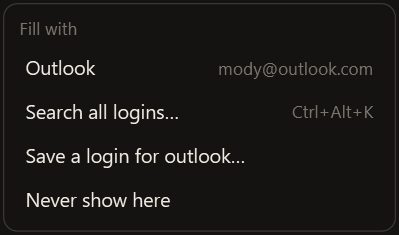
“Fill with MoLock”
A small chip appears beside password fields in desktop apps. Pick a login and it is typed in for you.
The Ctrl+Alt+K palette
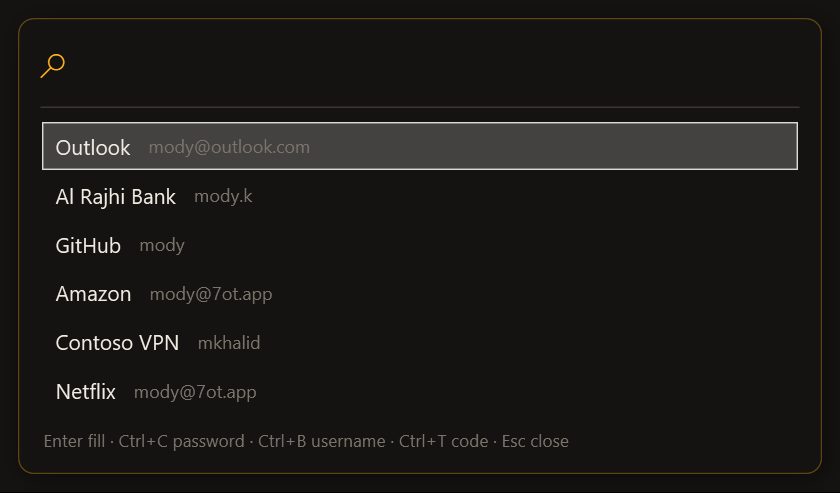
Search from anywhere, then fill, or copy the password, the username or the code.
A clipboard that forgets
Copied passwords are cleared after 20 seconds and kept out of clipboard history and cloud clipboard sync.
Authenticator codes
Paste a site's setup key into a login and Keys shows the current code, fills it and copies it.
Save and Update
“Save to MoLock?” after a new sign-in, “Update?” when a password changes. Choose never, and it stops asking for that site.
Import and export
Import from Chrome, Edge, Firefox, Bitwarden and LastPass. Export encrypted, or as a plain CSV file after you confirm it's you.
03 / 09Password health
Know what to fix. And in what order.
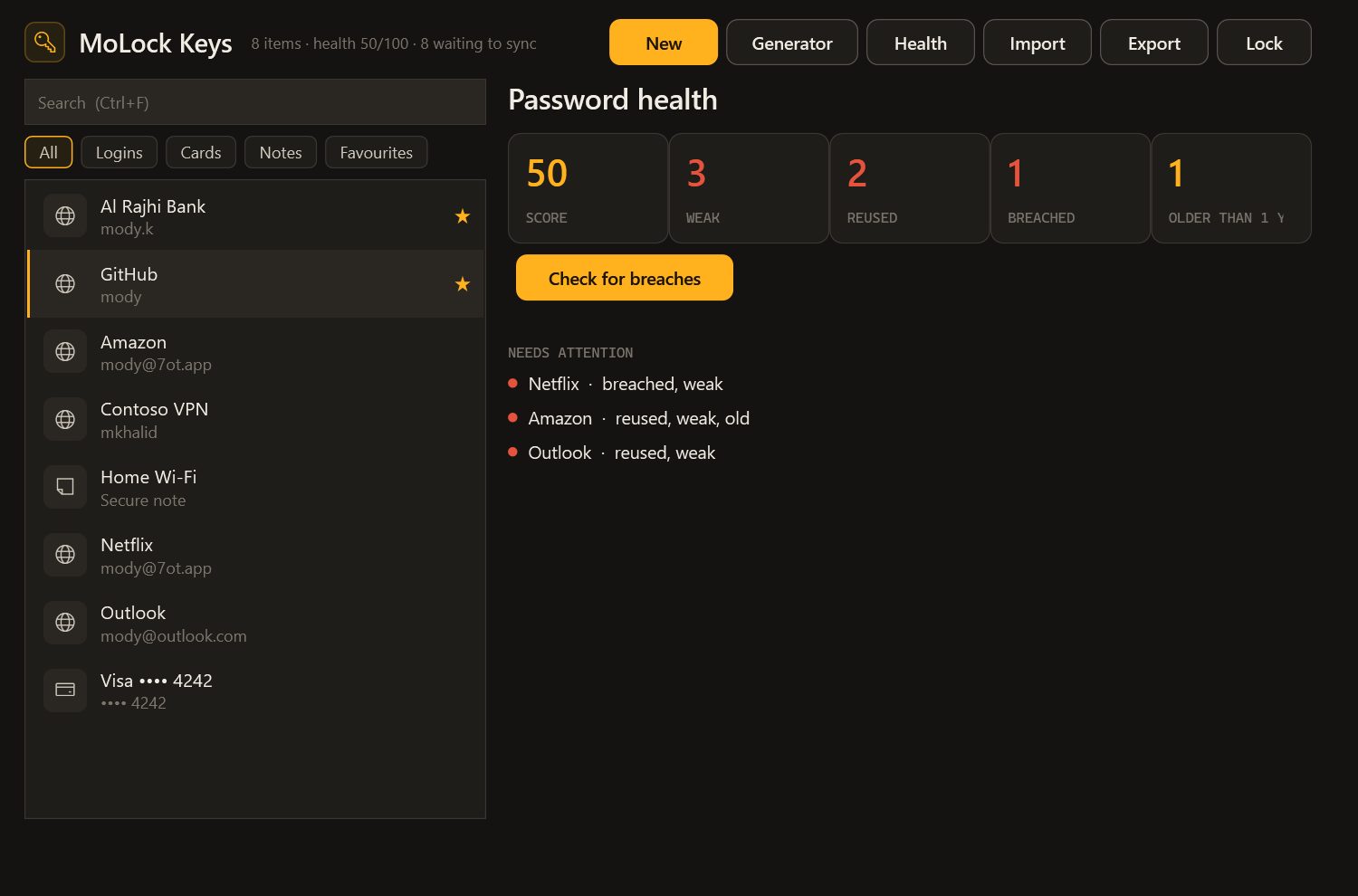
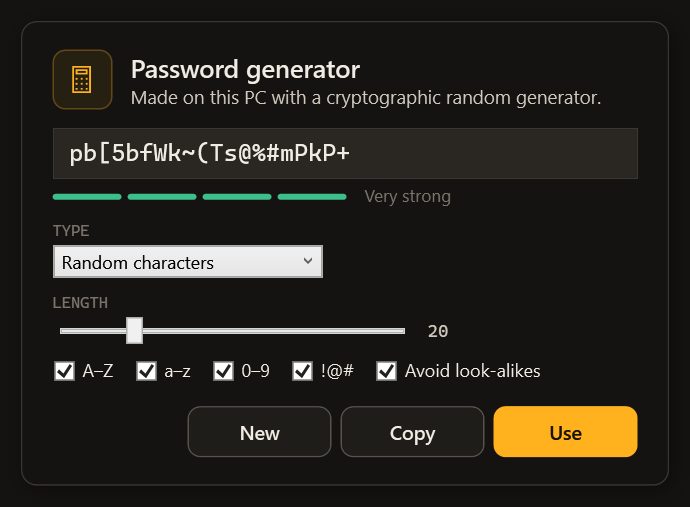
Keys makes strong passwords, rates each one as you type, and lists those that need attention — weak, reused, breached or unchanged for over a year — as one score from 0 to 100.
- Generator and strength meterNew passwords are made on your PC, and every password gets a rating from very weak to very strong.
- Breach check, privatelyOnly five characters of a one-way fingerprint of the password leave the PC; the match happens on your PC. You can switch it off.
- One score, clear fixesChange breached passwords first, then reused ones — starting with your email.
- Part of Security healthThe counts — never the passwords — feed MoLock's single Security health page.
04 / 09Browsers & apps
A messenger in the browser. A helper in every app.
The extension never stores a password. Each time it needs one, it asks the MoLock app on your PC, which answers only while the vault is unlocked.
- Paired with a matching codePress Connect in the extension. MoLock asks “Allow this browser?” while both show the same short code — allow it only if they match.
- The page can't peekThe fill menu and the save bar are the extension's own pages, so the site's scripts can't read them. A look-alike site gets nothing.
- It asks every timeVault locked? The extension asks you to unlock it in MoLock first — with your password, Windows Hello or the quick PIN.
- Desktop apps tooMail programs, VPN clients, game launchers: the chip sits beside the password field, never reads what you type and stays out of screenshots.
- Ctrl+Alt+K, anywhereEnter fills, Ctrl+C copies the password, Ctrl+B the username and Ctrl+T the code.
05 / 09Privacy
Sealed on your PC. Opened only by you.
The service stores your vault as sealed items it cannot open. It can see how many there are, when each one changed and how large it is — never a name, a site, a username or a password.
End-to-end encrypted
Items are sealed with your account key on the PC and unsealed only on your PC or in your own signed-in browser.
A breach check that never sees the password
Five characters of a one-way fingerprint go out; a long, padded list comes back, and the comparison happens on your PC.
Nothing kept in the browser
The extension holds a value only for a single fill. A password captured for “Save” waits two minutes for your answer, then is dropped.
Synced, unreadable to us
- Logins, passwords and notes
- Authenticator keys and cards
- Health counts for your dashboard
Stays with you
- Your passwords in readable form
- Your quick PIN and unlock password
- What you type in other apps
To sync and count
- How many items you have
- When each item changed, and its size
- Whether you're within your plan's limit
06 / 09Dashboard & bot
Your vault in any browser. Unsealed only there.
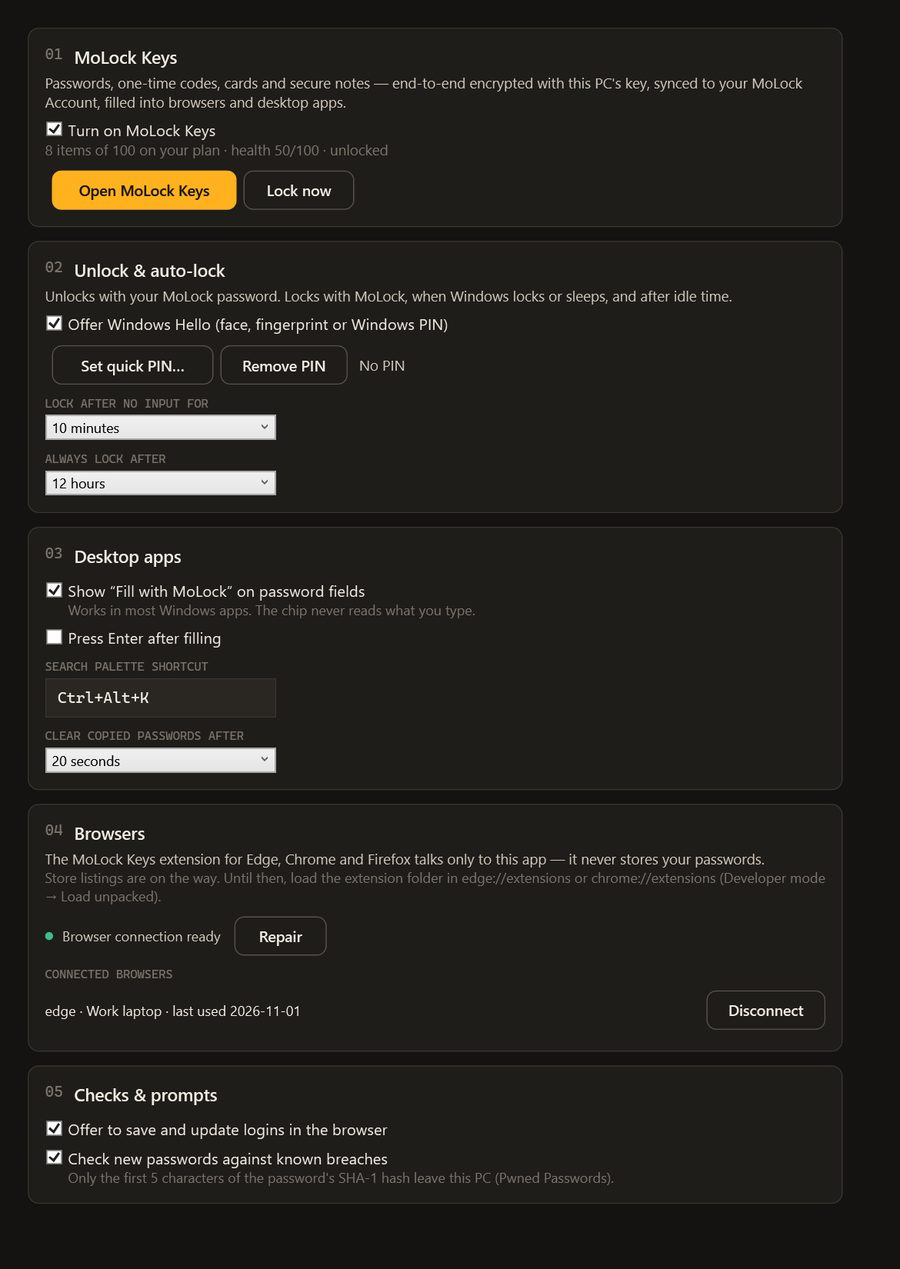
7ot.app/me/keys/ lets you browse, search, add and edit away from your PC. The Keys settings — auto-lock, clipboard time, the chip, breach checks, save prompts — follow you both ways.
- Browse, search, add and edit at 7ot.app/me/keys/ — items are unsealed in your browser, and authenticator codes tick live.
- Import from Chrome, Edge, Firefox, Bitwarden or LastPass; export encrypted, or as CSV after confirming it's you.
- Lock the vault on your PC with one press. The bot's summary shows counts only — items, weak, reused, breached and the health score.
07 / 09Limits
Exactly what it does. And what it doesn't.
The PC app does the work
Filling needs MoLock running on your PC with the vault unlocked. There is no autofill on phones — open 7ot.app/me/keys/ and copy what you need.
Not every app plays along
Programs that draw their own fields, such as some games, may not show the chip. The Ctrl+Alt+K palette can still copy.
It can't rescue an infected PC
Malware already running as you can watch the screen and keyboard. Keep Windows updated and the ransomware shield on.
Nobody can read it back to you
Because the service can't read your vault, it can't recover it for you either. Keep your MoLock password safe.
08 / 09Read more
In-depth guides. In plain words.
A password manager done right: inside MoLock Keys
Most accounts are not lost to clever hackers but to one password used in too many places. Here is how MoLock Keys fixes that habit without asking you to trust anyone with your passwords, and where its limits are.
End-to-end encryption, in plain words
"End-to-end encrypted" appears on a lot of apps. Here is what it actually means inside MoLock — with a locked box instead of maths — including the little the service can still see and what happens if you forget your password.
What is 7ot.app? Our story, and what comes next
A short name with a long story: how an Arabic word for a whale became the address of MoLock, who builds it, the principles that do not change, and how you can help decide what comes next.
09 / 09Questions
MoLock Keys password manager
Can anyone at MoLock see my passwords?
No. Every item is sealed on your PC before it syncs and is unsealed only on your PC or in your own signed-in browser. The service sees only how many items you have, when they changed and their size — the privacy policy lists it.
Is MoLock Keys free?
Yes, for up to 100 items on the Free plan; Premium removes the limit. Every tool — the extension, the chip, the Ctrl+Alt+K palette, the breach check and password health — is available on both plans.
Which browsers does it work with — and do I need the extension?
The extension works with Edge, Chrome and Firefox and stores no passwords — it asks the MoLock app on your PC every time. It's optional: the “Fill with MoLock” chip, the Ctrl+Alt+K palette and the dashboard all work without it.
How does the breach check work without sending my password?
MoLock turns the password into a one-way fingerprint on your PC and sends only its first five characters to a free public list of breached passwords. A long list of everything starting with those characters comes back, and the comparison happens on your PC — the service never learns your password. You can switch the check off in the Keys settings.
What if my laptop is stolen?
The vault locks after a few idle minutes, whenever MoLock or Windows locks and when the PC sleeps, and the file on disk is always sealed. From the dashboard you can lock it on the PC with one press.
Can I move my passwords from my browser or another manager?
Yes. Export them from Chrome, Edge, Firefox, Bitwarden or LastPass, then choose Import in the Keys window or at 7ot.app/me/keys/. Delete the export file afterwards — it holds your passwords in plain text.
Free · no ads
Try it on your PC today.
Windows 10 & 11 · works without an account; the dashboard is optional and free