MoLock Free vs Premium: how plans and serials work
MoLock 3.0 introduces plans for the first time. Here is the whole picture in plain terms: what stays free, what Premium adds, how a serial is activated and moved, and the rules that protect you either way.
Mahmoud Mohamed · 7 min read
Why MoLock now has plans
Most of MoLock runs on your own PC: the lock screen, intruder photos, motion alerts, walk-away lock, focus sessions and prayer times cost nothing to keep running, because your PC does the work. The cloud side is different. Storing your files, receiving and sending your email, relaying a remote-control session and keeping 400 days of history all use real resources every day.
Plans are how MoLock pays for that side without ads and without selling anything about you. The Free plan stays generous enough for one person to use every feature family that matters day to day. Premium is for people who need more room: several PCs, a family, large files, long remote sessions. Their serials keep the service running for everyone.
Just as important is what plans are not. No protection that runs on your PC moved behind a paywall in 3.0. A plan changes how much the cloud does for you; it never decides whether your PC is protected.
Free and Premium, side by side
These are the default values today. They can change over time, and the Premium page always shows the current ones.
| Feature | Free | Premium |
|---|---|---|
| PCs on your account | 2 | 10 |
| Storage (files, mail and recordings together) | 500 MB | 20 GB |
| Largest single file | 100 MB | 4 GB |
| Your own name@7ot.app address | Yes | Yes |
| Emails sent per day | 20 | 500 |
| Remote control | 60 minutes a day | Unlimited |
| Session recording | No | Yes |
| Converter | Basic: images, PDF basics, text, archives | Pro: adds video, audio, office, ebooks, presets, large batches |
| Daily history of modules such as screen time | 30 days | 400 days |
| Synced notes, to-dos and reminders | 500 items | Unlimited |
| Family and parental controls | No | Up to 6 members |
| Priority support | No | Yes |
A few things are the same on both plans and worth saying out loud: share links, the direct encrypted connection for remote control, the backup of your vault key, and of course every protection on the PC.
PlansFree · Premium
| Free | Premium | |
|---|---|---|
| PCs linked to your account | 2 | 10 |
| Cloud storage (files, mail and recordings) | 500 MB | 20 GB |
| Emails you can send per day | 20 | 500 |
| Remote minutes per day | 60 | Unlimited |
| Session recording | — | |
| Pro converter: video, audio, office, ebooks, presets, batches over 20 | — | |
| Dashboard history kept | 30 days | 400 days |
| Family members | 0 | 6 |
Premium comes with a serial that covers several PCs · no card payments on the site
What a serial is
A serial is the key that turns a PC, and with it your account, into Premium. It looks like 7OT-XXXXX-XXXXX-XXXXX-XXXXX: five groups of letters and digits, the last of which includes a check character, so most typos are caught straight away.
Every serial carries three things:
- A plan, normally Premium.
- A number of PCs it covers. One serial can cover a single laptop or every PC in a home. Each PC can hold at most one serial at a time.
- A duration: a set number of days from activation, or lifetime.
How does that map onto your account? Each PC gets the plan of its own serial, or Free if it has none. Your account, meaning things like storage, mail and family, gets the best active plan among all your PCs. Say you have three PCs and a serial that covers two: those two are Premium, the third is Free on its own, and your account enjoys Premium storage, mail limits and family controls.
Where serials come from
Serials are sold directly by MoLock. There is no card form on the website, and that is deliberate: a payment page is one of the most copied pages on the internet, and having none means there is nothing for a fake site to imitate. The Premium page explains, under How to get a serial, the official way to buy one. Use only that route, and be wary of serials offered anywhere else.
Entering your serial
There are three places to enter a serial, and they all lead to the same result.
- During setup. The setup wizard has a plan step. Paste the serial there, or skip it and stay on Free.
- Later, on the PC. Open Settings → Plan (in the Account & plan group). Paste the serial and confirm. The PC needs an internet connection for this step.
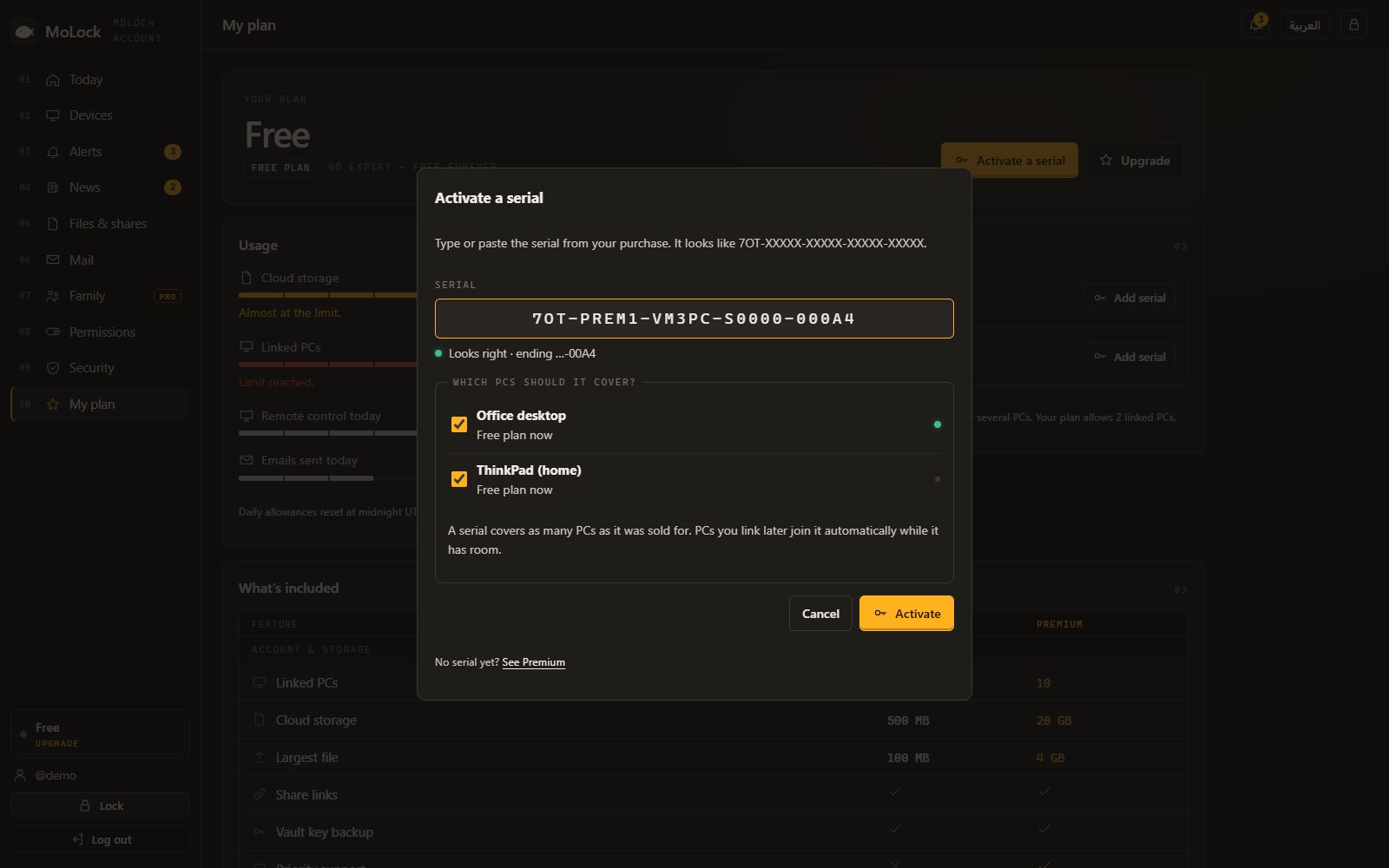
- From your dashboard. Open your dashboard, go to Plan, enter the serial and choose which PC or PCs it should cover. This is the easiest way to set up several PCs at once.
- Check the result. The Plan panel on the PC and in the dashboard shows the plan, the end date or lifetime, and the last four characters of the serial. You also receive a serial activated email.
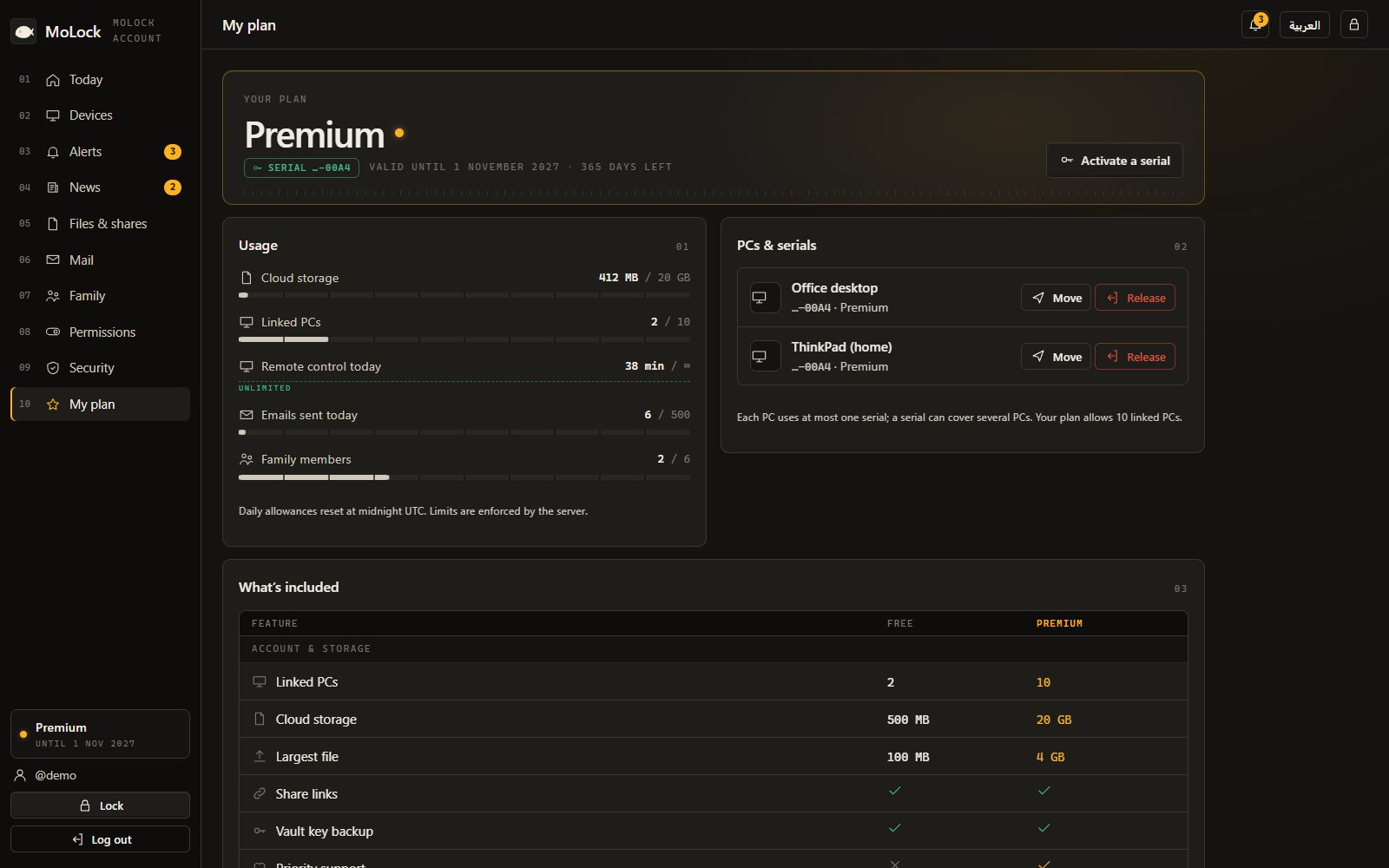
Activation binds the serial to the PC and to your account together. From that moment, the new limits apply in the app and in the dashboard; there is nothing to restart.
Moving a PC or freeing a seat
PCs change: a laptop is replaced, a desktop goes to a relative, a child gets their own machine. The dashboard's Plan page handles that without contacting anyone:
- Release a PC to free its seat on a serial. The PC returns to Free, and the seat is available for another one.
- Move a PC to another serial, for example when you buy a second serial for a growing household and want to rearrange which PC sits on which.
Both actions are limited to a sensible number within a short period, to stop serials from being passed around. A released PC keeps every local protection exactly as it was; only its cloud limits return to the Free values.
When you reach a limit
Limits are checked by the MoLock service itself, not just by the app, so they are applied the same way everywhere. What matters to you is how that feels: when an action would go over a limit, MoLock shows a calm upgrade card that says which limit you reached, how much you have used, and what you can do. It is never a crash, and it never interrupts the protection on your PC.
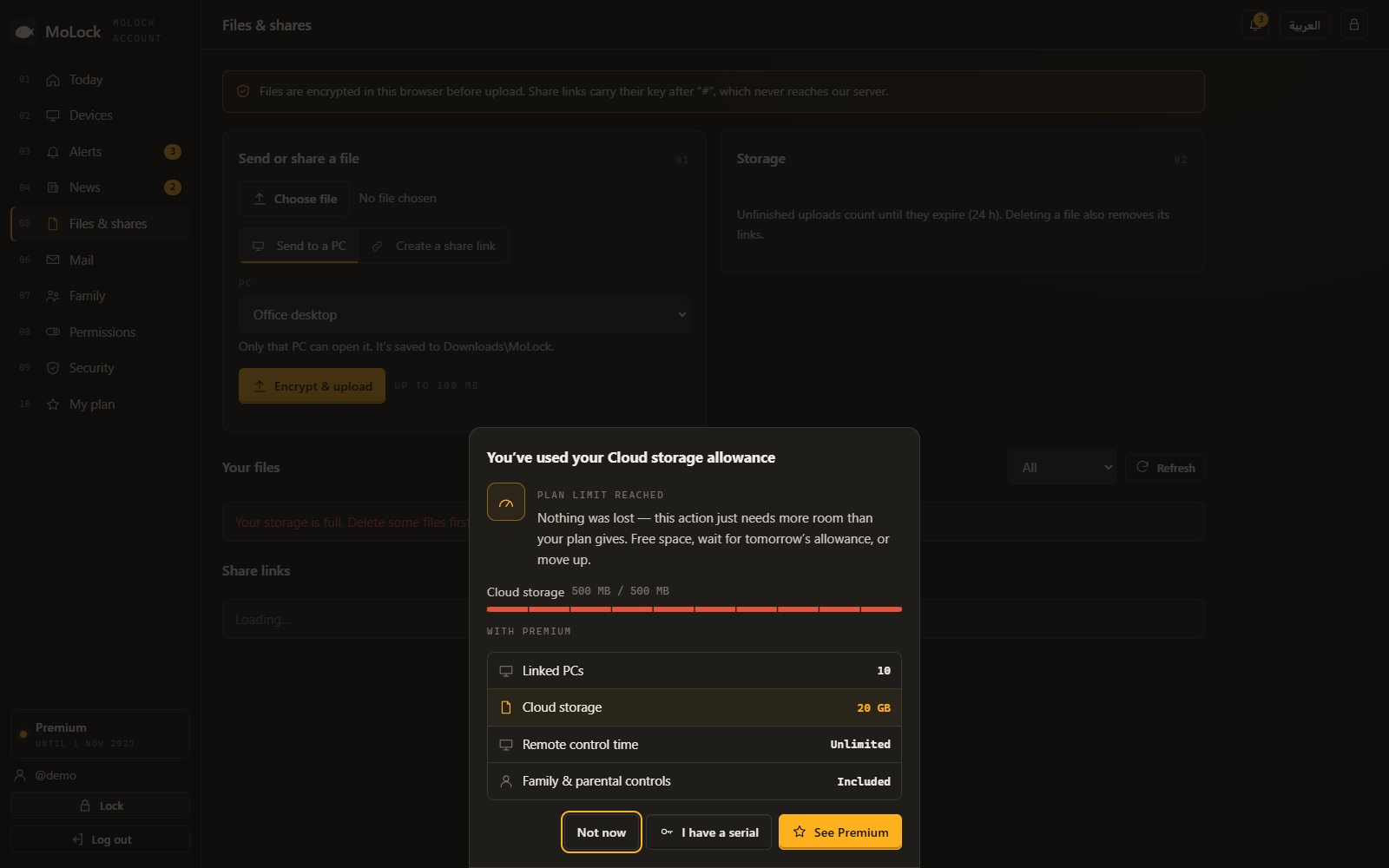
- Storage is full: new uploads pause until you free some space or upgrade. Reaching a limit does not delete your files.
- Daily email limit: sending pauses until the daily count starts again.
- Remote minutes: on Free, once the day's 60 minutes are used, remote control waits until the next day.
- PCs: you cannot link another PC until you unlink one or upgrade.
- Premium-only features, such as session recording, the pro converter or family controls, show the card instead of starting.
When a serial ends
A lifetime serial does not end. A serial with a duration shows its end date in Settings → Plan and in the dashboard, and MoLock sends a plan expiring email before that date so it never comes as a surprise.
When the date passes, the PCs on that serial return to the Free plan. The same calm rules as above apply: if you are above a Free limit, new uploads or sends pause, and the upgrade card explains why. To continue on Premium, activate a new serial and move your PCs to it from the dashboard.
A plan changes how much the cloud does for you. It never decides whether your PC is protected.
How serials are protected
A serial is worth money, so it is treated with the same care as a password:
- Only the last four characters are ever shown back, in the app, in the dashboard and in emails. Once you have entered a serial, nobody looking at your screen can read it.
- Serials are kept only in a scrambled, one-way form. Even MoLock's own records cannot turn them back into the readable code.
- Guessing is pointless. After 5 wrong serials within an hour, from the same account or the same network, entry pauses for an hour.
- The plan cannot be faked on the PC. Your PC learns its plan from the service in a message that carries a signature check, so editing files on the PC does not turn Free into Premium.
Fair rules, and what they never touch
Using MoLock means accepting the terms of service, which describe how the service may and may not be used. When an account breaks them, MoLock can issue a warning, a suspension (until a date or until further notice) or, in serious cases, a ban. Each action is recorded with a reason, and a suspended account's sign-in page shows a clear notice with that reason and a way to get in touch. A serial can also be suspended or revoked under the terms.
One rule stands above all of these: suspending or banning an account never stops local protection. The PC keeps locking, keeps taking intruder photos and keeps protecting its owner. Only cloud features stop. MoLock will never use your own lock screen against you.
Still have questions? The FAQ covers the common ones, and Introducing MoLock 3.0 shows everything else that arrived with plans.