Prayer times on your desktop: accurate methods explained
Two apps, one city, two different Fajr times. That is rarely a bug; it is a choice of method. Here is how prayer times are calculated, how to match the timetable your local authority and mosque use, and how MoLock keeps them in view without getting in the way.
Mahmoud Mohamed · 10 min read
Why two apps rarely agree to the minute
Open three prayer apps in the same city and you may well see three different Fajr times, a few minutes apart. It is tempting to conclude that one of them is wrong. Usually none is: each is faithfully applying a different set of rules. The differences come from a handful of choices.
- The calculation method. Fajr and Isha depend on how far below the horizon the sun must be, and different authorities use different angles. A single degree moves the time by several minutes.
- The Asr rule. The Shafi'i and Hanafi schools define the start of Asr by different shadow lengths, which can put the two times more than half an hour apart.
- Your exact location. Prayer times follow the sun, not the clock. Each degree of longitude shifts them by about four minutes, which is why Alexandria's Maghrib comes a few minutes after Cairo's.
- Safety minutes and rounding. Some authorities add a minute or two of precaution to certain prayers. Some apps round to the nearest minute; others always round up.
- The device clock. A wrong time zone, or a daylight-saving change the PC missed, moves every time by a full hour.
Once you know which choices an app has made, the "disagreement" disappears. That is why MoLock shows its choices plainly and lets you change each one.
How each prayer time is calculated
Every line of a prayer timetable describes a moment in the sun's daily path, as seen from where you are. Working it out needs only three things: your coordinates, the date and the method. That is why accurate times can be calculated entirely offline, with no server involved.
Fajr and Isha: the sun below the horizon
Fajr begins at true dawn, when the first faint light spreads along the eastern horizon while the sun is still well below it. Isha begins when the last of the evening twilight has faded from the western sky. Neither moment can be read off a clock, so astronomers express each one as an angle: how many degrees below the horizon the sun is. The Egyptian General Authority of Survey, for example, places Fajr at 19.5° and Isha at 17.5°. Other authorities, working from their own observations and scholarly traditions, settled on other angles — and that is the single biggest reason timetables differ.
Some methods do not use an angle for Isha at all, but a fixed interval after Maghrib. Umm al-Qura, the calendar used in Saudi Arabia, sets Isha 90 minutes after Maghrib, and 120 minutes during Ramadan.
Sunrise and Dhuhr
Sunrise is not a prayer, but it marks the end of the time for Fajr, so every timetable shows it. Dhuhr begins just after midday — not 12:00 on the clock, but the moment the sun passes its highest point in the sky and starts to descend. In Cairo in early November, that is around 11:39.
Asr: the length of a shadow
Asr is defined by shadows. At midday every upright object casts its shortest shadow of the day. In the Shafi'i school — and the Maliki and Hanbali schools agree — Asr begins when the shadow has grown beyond that midday shadow by the object's own length. In the Hanafi school, it begins when the extra length is twice the object's height. On our example day in Cairo, the first rule gives Asr around 2:45 PM; the Hanafi rule gives a time roughly three-quarters of an hour later.
Maghrib: sunset
Maghrib begins at sunset, the moment the upper edge of the sun disappears below the horizon. The calculation allows for the way the atmosphere bends light near the horizon, which keeps the sun visible for a short while after it has, geometrically, already set.
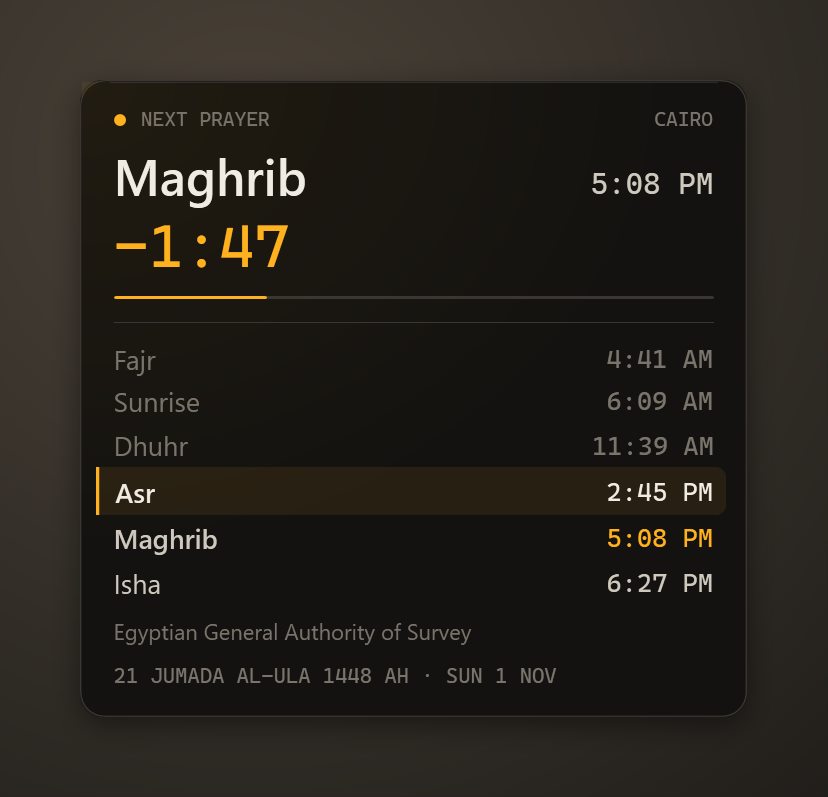
| Cairo, Sunday 1 November 2026 | Around |
|---|---|
| Fajr | 4:41 AM |
| Sunrise | 6:09 AM |
| Dhuhr | 11:39 AM |
| Asr | 2:45 PM |
| Maghrib | 5:08 PM |
| Isha | 6:27 PM |
Egyptian General Authority of Survey method, Shafi'i Asr; the Hijri date that day is 21 Jumada al-Ula 1448. Your own neighbourhood may differ by a minute.
The calculation methods, side by side
MoLock includes the methods most widely used across the Muslim world. The angles below are the depression of the sun below the horizon at Fajr and at Isha.
| Method | Fajr | Isha | A common choice in |
|---|---|---|---|
| Egyptian General Authority of Survey | 19.5° | 17.5° | Egypt |
| Umm al-Qura | 18.5° | 90 min after Maghrib (120 in Ramadan) | Saudi Arabia |
| Muslim World League | 18° | 17° | Much of Europe and many other regions |
| Islamic Society of North America (ISNA) | 15° | 15° | North America |
| University of Islamic Sciences, Karachi | 18° | 18° | Pakistan, India, Bangladesh |
| Dubai | 18.2° | 18.2° | United Arab Emirates |
| Kuwait | 18° | 17.5° | Kuwait |
| Qatar | 18° | 90 min after Maghrib | Qatar |
| Singapore | 20° | 18° | Singapore and its neighbours |
| Turkey (Presidency of Religious Affairs) | 18° | 17° | Turkey |
Calculation methodFajr · Isha
| Method | Fajr | Isha |
|---|---|---|
| Egyptian General Authority | 19.5° | 17.5° |
| Umm al-Qura | 18.5° | 90 min after Maghrib |
| Muslim World League | 18° | 17° |
| ISNA (North America) | 15° | 15° |
| Karachi | 18° | 18° |
| Dubai | 18.2° | 18.2° |
| Kuwait | 18° | 17.5° |
| Qatar | 18° | 90 min after Maghrib |
| Singapore | 20° | 18° |
| Turkey | 18° | 17° |
Asr: Shafi'i or Hanafi · high-latitude rules · per-prayer minute offsets
To see what these numbers mean in practice, stay with the same day in Cairo. With the Egyptian method, Fajr falls around 4:41. Switch to the Muslim World League's 18° and it moves to around 4:48; ISNA's 15° puts it near 5:02. For Isha, Umm al-Qura's fixed interval gives 6:38 — 90 minutes after a 5:08 Maghrib — against around 6:27 with the Egyptian angle. Same sun, same city, different rules.
Which method should you choose?
The short answer is the method your local authority uses. A calculation method is not a matter of software accuracy or personal taste: each one reflects a decision by scholars and astronomers for a particular region. MoLock does not rule on which is correct, and no app should. What it can do is match the timetable you already trust.
- In Egypt, choose the Egyptian General Authority of Survey.
- In Saudi Arabia, choose Umm al-Qura.
- In the UAE, Kuwait, Qatar, Singapore or Turkey, choose the method named after your country.
- Elsewhere, ask your mosque or Islamic centre which method its timetable follows. Karachi is common in South Asia, ISNA in North America and the Muslim World League in many other places, but local practice varies.
Shafi'i or Hanafi Asr
Choose the school you follow. If you are not sure, look at your mosque's Asr time: if it matches MoLock's Shafi'i Asr, keep that; if it is clearly later, try Hanafi.
High latitudes: when the sky never gets dark
Far enough north — much of the UK, Scandinavia and Canada — the sun does not sink far enough below the horizon on summer nights for the Fajr and Isha angles to be reached. For weeks around midsummer the formula simply has no answer. High-latitude rules fill the gap by estimating Fajr and Isha from a portion of the night instead. Communities have adopted different rules, so the advice is the same as for the method: use the one your local mosque follows, and check your timetable again in late spring, when the effect starts.
Matching your mosque: offsets and the Hijri date
Even with the right method, your mosque's printed timetable may differ by a minute or two from any calculation — because of safety minutes, rounding, or simply because it was computed for a point a few streets away. MoLock lets you add a minute offset to each prayer separately. If your mosque calls Dhuhr two minutes after MoLock's time, add two minutes to Dhuhr and leave the others alone.
The Hijri date follows the Umm al-Qura calendar and can be adjusted by up to two days either way. In many countries the start of a month — Ramadan and Shawwal above all — is confirmed by an official moon-sighting announcement, so the local date can differ from a calculated calendar. If your country announces that the month began a day later, shift the date by one day.
On your desktop and on the lock screen
The active desktop widget is where most people meet MoLock's prayer times. It shows the day's prayers with the next one highlighted and a live countdown to it, so a glance tells you whether you have time to finish the email or should save and stand up. Keep it compact or expand it, drag it wherever it suits your desktop, and click it to open the month's timetable.
Your location comes from an offline city search or from Windows location, as you prefer. Because every calculation happens on the PC, the widget keeps working on a plane, in a hotel with no Wi-Fi or during an internet outage.
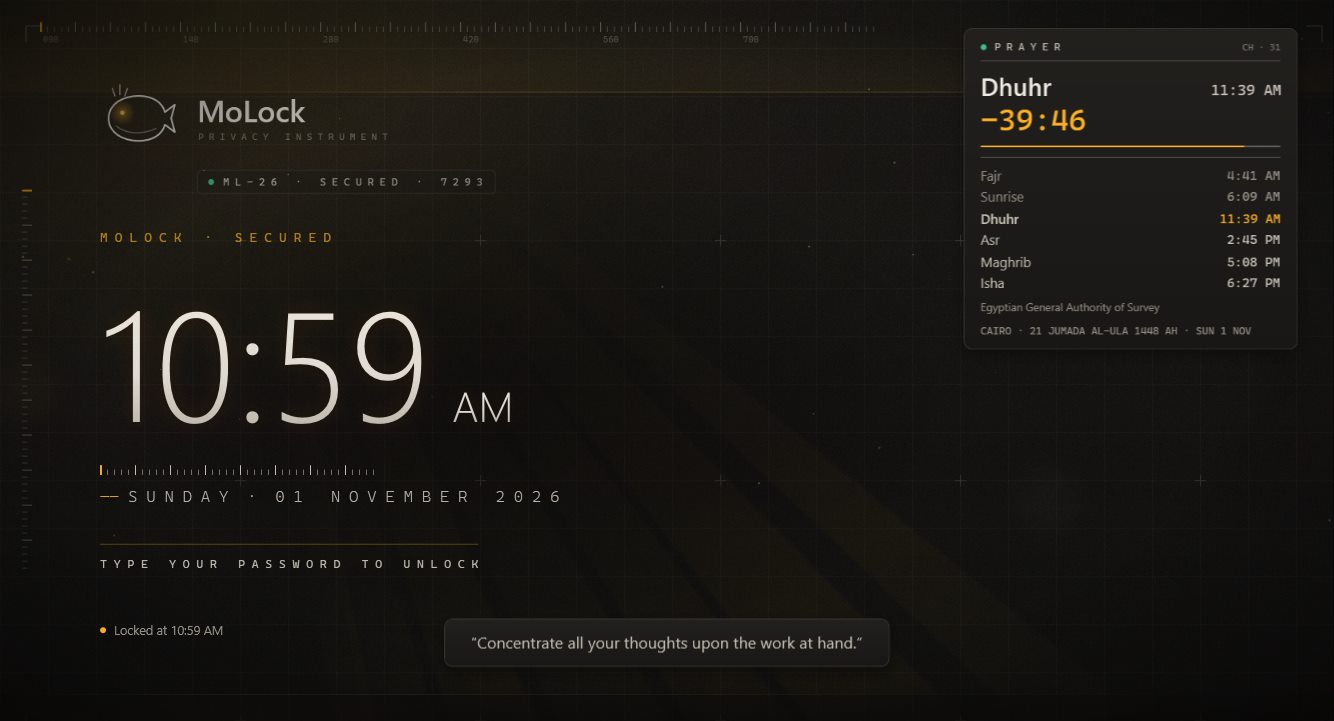
When the PC is locked, the lock-screen widget keeps the next prayer in view, so you can check the time on your way back to your desk without unlocking. It is designed to stay light, in the same spirit as the rest of MoLock's lock screen — see Why your lock screen should not feel heavy.
Reminders that respect the moment
A prayer reminder on a work computer has to strike a balance: impossible to miss, but never jarring. MoLock gives you the pieces and lets you choose how many to use.
- Adhan or a gentle reminder. Play the full adhan or a short, soft tone. The recordings MoLock ships are open-licensed.
- Pre-reminders. A quiet notice a few minutes before the time, as many minutes ahead as you choose, so you can wrap up a call or save your work.
- Pause media at adhan. A video, a podcast or music pauses by itself when the adhan begins.
- Prayer lock. If you want a firmer nudge to step away, the optional prayer lock calmly covers the screen for the number of minutes you set. It is optional and entirely your choice.
- Friday reminder. A reminder ahead of the Friday prayer, so Jumu'ah does not slip past during a busy morning.
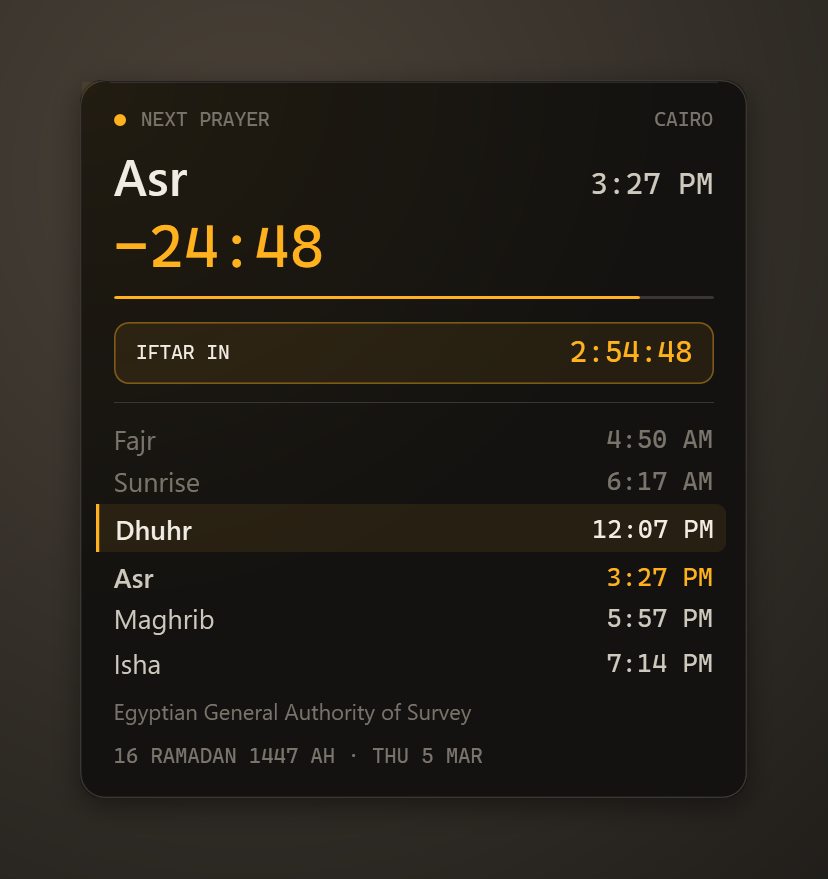
Ramadan mode adds what the month needs: a countdown to imsak before dawn and to iftar at Maghrib, and a suhoor alarm to wake you in time to eat.
The right method is the one your local authority uses. MoLock's job is to match it, not to judge it.
Your timetable on your phone, and a few honest notes
Your MoLock Account dashboard shows the timetable and every prayer setting. Change the method or an offset there and the change is sent to the PC; if the PC is off, it arrives when the PC next connects. If you like, the Telegram bot can send you the day's times once a day, and /prayer opens a small menu with 💤 Snooze 10 min, 📋 Summary and Open in dashboard — handy when a reminder catches you mid-meeting. Quiet hours and notification levels are set per kind in the dashboard, like every other MoLock alert.
A few things worth knowing:
- A calculation is not an announcement. Calculated times are very good estimates of astronomical moments. Where your local authority or mosque announces a time, that announcement is the reference.
- The Hijri date is a calculated calendar. When your country announces the start of a month after the moon sighting, check that MoLock's date agrees, and apply a one- or two-day adjustment if it does not.
- Check the PC's clock. If every time is exactly an hour out, the culprit is almost always the Windows time zone or daylight-saving setting, not the method.
How to set it up
- Set your location. Search for your city (it works offline) or let MoLock use Windows location.
- Choose the method your local authority uses. In Egypt, the Egyptian General Authority of Survey; in Saudi Arabia, Umm al-Qura; elsewhere, ask your mosque.
- Choose your Asr school. Shafi'i or Hanafi, as you follow.
- Compare with your mosque and add offsets. A minute here or there, per prayer, until the two timetables agree.
- Check the Hijri date. Adjust it by a day or two if your country's announcement differs.
- Place the widget and pick your reminders. Adhan or gentle tone, pre-reminders, pause media, and — only if you want it — the prayer lock. In Ramadan, switch on Ramadan mode.
Everything above is summed up on the prayer times page. If you are building calmer work habits around your day, our guide to screen time and the focus tools pair naturally with it.